> ## Documentation Index
> Fetch the complete documentation index at: https://docs.sudocode.ai/llms.txt
> Use this file to discover all available pages before exploring further.
# Spec-Driven Development
> Build software with durable context and bidirectional feedback
## What is Spec-Driven Development?
Spec-driven development (SDD) is a workflow where specifications serve as the foundation for all implementation work. Instead of requirements living in disconnected documents, specs become version-controlled, queryable artifacts that evolve alongside your code through bidirectional feedback between humans and AI agents.
Spec-driven development treats specifications as first-class citizens in your codebase, creating a continuous feedback loop between design intent and implementation reality.
**Traditional development:**
1. Write requirements (Google Docs, Notion, Jira)
2. Implementation begins
3. Requirements drift from reality
4. Documentation becomes stale
5. Context is lost
**Spec-driven development:**
1. Write specs as version-controlled markdown
2. AI agents generate tasks as issues from the spec
3. Agents execute tasks, discovering ambiguities
4. AI agents provide feedback to the spec as they process issues
5. Users can update specs based on learnings
6. Spec remains synchronized with implementation
7. Context is durable and queryable
## How sudocode Implements SDD
sudocode provides the infrastructure for spec-driven development:
### Specs as First-Class Entities
Specs are version-controlled markdown files stored in `.sudocode/specs/`:
* Each spec has a unique ID (e.g., `s-50kd`)
* Contains requirements, architecture, and design decisions
* Supports hierarchical organization (parent-child specs)
* Queryable through CLI, MCP, and web UI
### Issues Implement Specs
Issues are work items linked to specifications:
* Created by agents or humans
* Linked to specs via `implements` relationship
* Track implementation progress and dependencies
* Provide feedback back to specs during implementation
### Anchored Feedback System
Agents provide feedback on specs as they discover ambiguities:
* Feedback anchored to specific lines in the spec
* Anchors auto-relocate when specs are edited
* Humans review feedback and update specs accordingly
* Keeps specs synchronized with implementation reality
### Dependency Graph
Work is modeled as a directed acyclic graph:
* Issues block other issues via `blocks` relationships
* `ready()` query finds unblocked work
* Agents claim ready work and implement features
* Completion automatically unblocks dependent work
This enables parallel work and topological execution order.
## The Spec-Driven Development Workflow
**Describe what you want to build, then collaborate with your agent to design it**
Start by describing your feature to your AI agent. The agent will explore your codebase, propose design approaches, and discuss trade-offs with you:
```
You: "I want to add a saved credit card feature to our payments API.
Users should be able to store their card details securely for faster
checkout in the future. Let's think together about how to implement this."
Agent: "I'd be happy to help design a saved credit card feature! Let me
first explore the current codebase to understand the existing architecture,
then we can discuss the implementation approach together."
```
As the agent explores, feel free to ask questions, provide constraints, and refine your requirements to scope the problem as much as possible.
```
You: "Approach 2 makes the most sense. Let's create a spec for this now."
Agent: [Uses upsert_spec() MCP tool to create specification with
requirements, architecture, API design, and open questions]
```
Review the spec in the web UI at `localhost:3000` and provide feedback or edits as needed.
* **Start conversational**: Describe intent, not implementation
* **Give agents context**: Give agents necessary context about the codebase, to maximize their understanding
* **Refine together**: Provide decisions, agent captures in spec
* **Review visually**: Use web UI to inspect final spec
**Agent breaks down the spec into issues and models dependencies**
Ask your agent to create implementation issues from the spec:
```
You: "Great. We left some feedback on the spec, please re-read it.
Then, create issues for this spec."
Agent: "I can see the spec has been updated. Now let me create issues
for implementing this spec based on the migration phases outlined."
```
The agent will:
1. Read the spec via `show_spec()` to understand requirements
2. Identify natural breakdown (database → domain → API → testing)
3. Create issues via `upsert_issue()` for each component
4. Link issues to spec via `link(type: "implements")`
5. Model dependencies via `link(type: "blocks")` to establish execution order
Then ask the agent to create dependencies between issues:
```
You: "Can you create dependencies between these issues?"
Agent: [Uses link() to model dependency graph, creating proper execution order]
```
Review the issues and dependency graph in the web UI to verify the plan makes sense.
**Agents work through issues in dependency order**
Dispatch agents to implement issues from the web UI at `localhost:3000`
**How agents execute work:**
1. Claim issue via `upsert_issue(status: "in_progress")`
2. Read spec and issue details for context
3. Implement the feature
4. Close issue with completion summary and feedback via `add_feedback()`
5. Next work automatically becomes ready
**Two ways to dispatch agents:**
* **Web UI**: Click "Dispatch Agent" on ready issues in kanban board
* **Conversation**: Agent claims work directly through MCP server
Agents can work in parallel on independent issues or sequentially through dependency chains.
**Agents surface ambiguities and learnings during implementation**
As agents implement issues, they may discover spec ambiguities or edge cases. Agents provide feedback anchored to specific spec lines:
```
Agent: [Discovers ambiguity on line 23 of spec]
Agent calls: add_feedback(
issue_id: "i-2vsy",
spec_id: "s-50kd",
content: "Token expiration not specified. Recommend explicit values.
Using 15min access / 7d refresh (industry standard) for now.",
type: "request",
line: 23
)
```
Feedback is visible in the web UI and survives spec edits through smart anchor relocation.
**Feedback types:**
* **request**: Need clarification or decision
* **suggestion**: Improvement ideas from implementation learnings
* **comment**: Observations or additional context
**Review feedback and update specs based on learnings**
Review agent feedback in the web UI and update the spec accordingly:
```markdown theme={null}
Before:
- Token expiration: reasonable defaults
After:
- Token expiration:
- Access tokens: 15 minutes (short-lived for security)
- Refresh tokens: 7 days (balance security and UX)
```
The spec evolves to stay synchronized with implementation reality. If agent feedback reveals missing work, ask the agent to create new issues and link them appropriately.
**Monitor project health through the issues board**
View your project's status visually in the web UI
**The issues board shows:**
* **Ready column**: Issues with no blockers, ready to be claimed
* **In Progress column**: Issues currently being worked on
* **Blocked column**: Issues waiting on dependencies
* **Completed column**: Finished work
Track real-time progress as agents work through the dependency graph.
## Complete Example Walkthrough
Let's walk through building a saved credit card feature for a payments API from start to finish. This example shows the full spec-driven development workflow with agent MCP and web-server interactions.
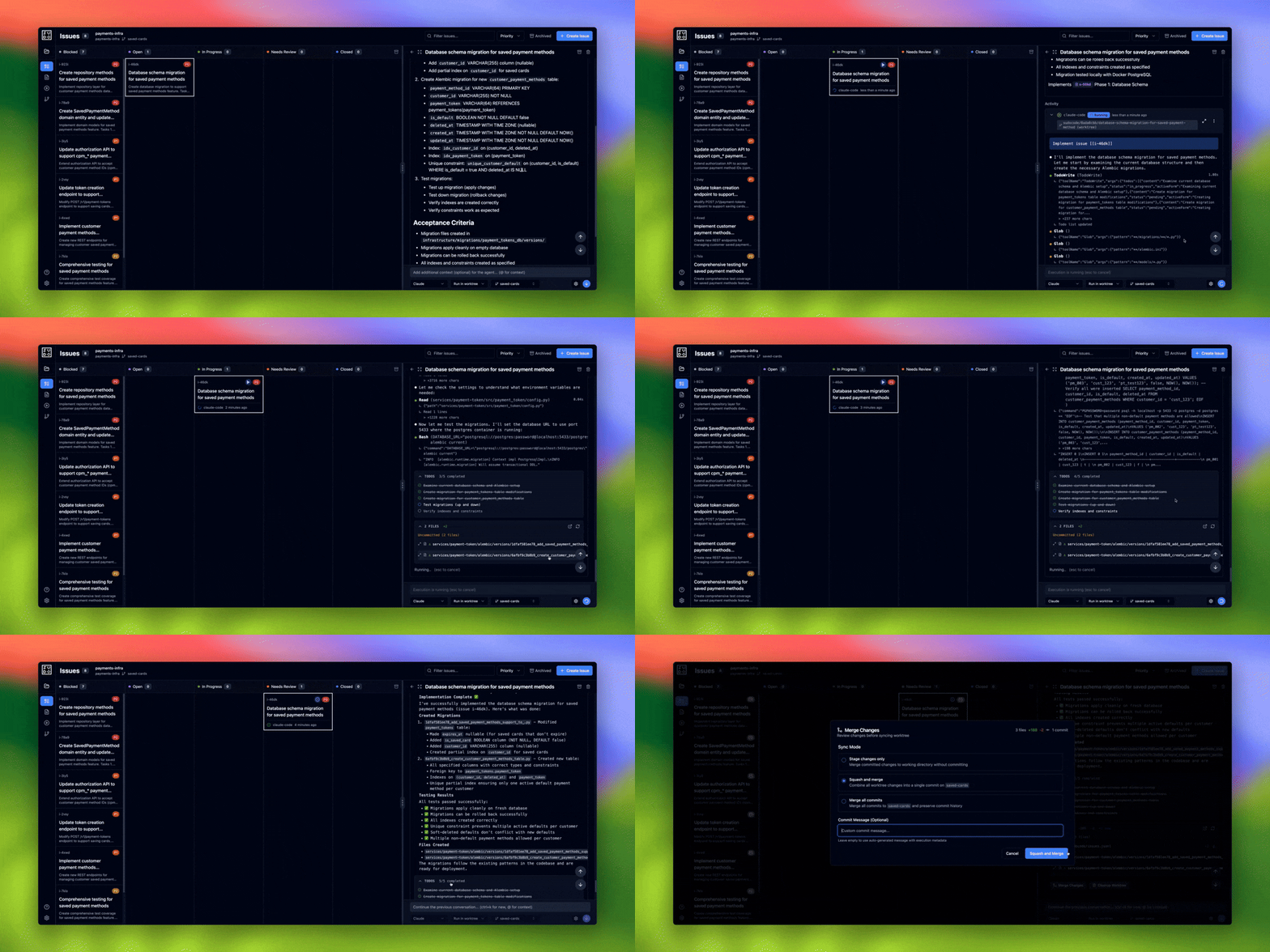 ### Phase 1: Co-create Specification with Agent
**Step 1: Start the conversation**
### Phase 1: Co-create Specification with Agent
**Step 1: Start the conversation**
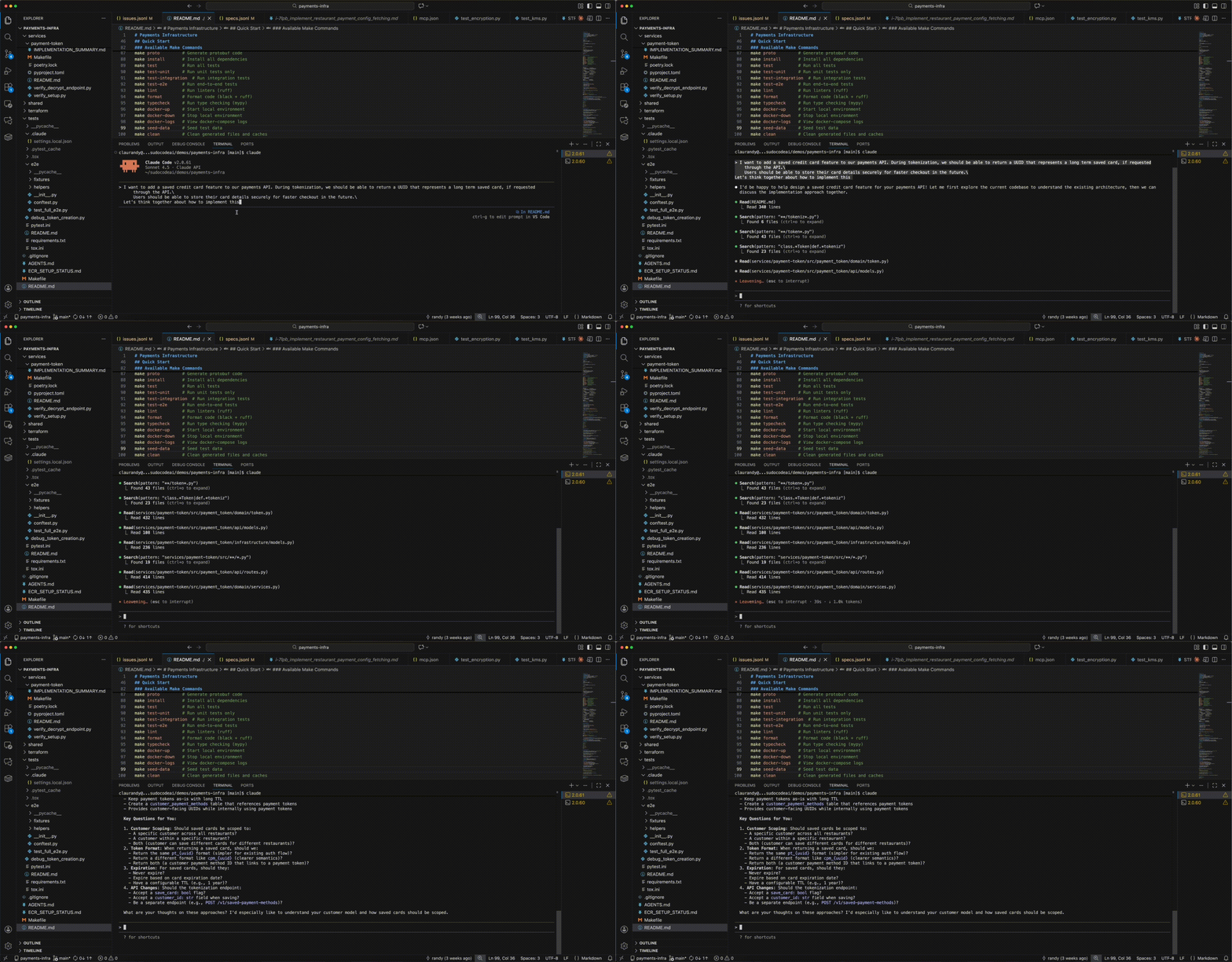 ```
> User: I want to add a saved credit card feature to our payments API.
During tokenization, we should be able to return a UUID that represents
a long term saved card, if requested through the API.
Users should be able to store their card details securely for faster
checkout in the future.
Let's think together about how to implement this.
⏺ Agent: I'd be happy to help design a saved credit card feature for your
payments API! Let me first explore the current codebase to understand
the existing architecture, then we can discuss the implementation
approach together.
```
**Step 2: Agent explores codebase**
```
⏺ Read(README.md)
⎿ Read 340 lines
⏺ Search(pattern: "**/token*.py")
⎿ Found 43 files (ctrl+o to expand)
⏺ Read(services/payment-token/src/payment_token/domain/token.py)
⎿ Read 432 lines
⏺ Read(services/payment-token/src/payment_token/api/routes.py)
⎿ Read 414 lines
```
**Step 3: Agent proposes design approaches**
```
⏺ Great! I've explored your payments infrastructure codebase. Now I have
a good understanding of the current architecture. Let me discuss with
you how we could implement a saved credit card feature.
Current State Analysis
Your payment tokenization system currently:
- Creates short-lived tokens (24 hours default TTL)
- Stores encrypted payment data with metadata
- Returns tokens in format pt_{uuid}
Design Considerations for Saved Cards
Let me outline a few approaches we could take...
Approach 2: Separate Saved Card Entity (Recommended)
- Create a new SavedPaymentMethod entity with its own UUID (cpm_{uuid})
- Link to the underlying payment token (which never expires)
- Stored at customer level, not restaurant level
Key Questions for You:
1. Customer Scoping: Should saved cards be scoped to...
2. Token Format: When returning a saved card, should we...
3. Expiration: For saved cards, should they...
4. API Changes: Should the tokenization endpoint...
```
**Step 4: Human provides design decisions**
```
> Approach 2 makes the most sense to me.
1. a specific customer (not restaurant)
2. just a uuid
3. never expire
4. accept a save_card flag and customer_id field (optionals)
let's create a spec for this
```
**Step 5: Agent creates the spec**
```
> User: I want to add a saved credit card feature to our payments API.
During tokenization, we should be able to return a UUID that represents
a long term saved card, if requested through the API.
Users should be able to store their card details securely for faster
checkout in the future.
Let's think together about how to implement this.
⏺ Agent: I'd be happy to help design a saved credit card feature for your
payments API! Let me first explore the current codebase to understand
the existing architecture, then we can discuss the implementation
approach together.
```
**Step 2: Agent explores codebase**
```
⏺ Read(README.md)
⎿ Read 340 lines
⏺ Search(pattern: "**/token*.py")
⎿ Found 43 files (ctrl+o to expand)
⏺ Read(services/payment-token/src/payment_token/domain/token.py)
⎿ Read 432 lines
⏺ Read(services/payment-token/src/payment_token/api/routes.py)
⎿ Read 414 lines
```
**Step 3: Agent proposes design approaches**
```
⏺ Great! I've explored your payments infrastructure codebase. Now I have
a good understanding of the current architecture. Let me discuss with
you how we could implement a saved credit card feature.
Current State Analysis
Your payment tokenization system currently:
- Creates short-lived tokens (24 hours default TTL)
- Stores encrypted payment data with metadata
- Returns tokens in format pt_{uuid}
Design Considerations for Saved Cards
Let me outline a few approaches we could take...
Approach 2: Separate Saved Card Entity (Recommended)
- Create a new SavedPaymentMethod entity with its own UUID (cpm_{uuid})
- Link to the underlying payment token (which never expires)
- Stored at customer level, not restaurant level
Key Questions for You:
1. Customer Scoping: Should saved cards be scoped to...
2. Token Format: When returning a saved card, should we...
3. Expiration: For saved cards, should they...
4. API Changes: Should the tokenization endpoint...
```
**Step 4: Human provides design decisions**
```
> Approach 2 makes the most sense to me.
1. a specific customer (not restaurant)
2. just a uuid
3. never expire
4. accept a save_card flag and customer_id field (optionals)
let's create a spec for this
```
**Step 5: Agent creates the spec**
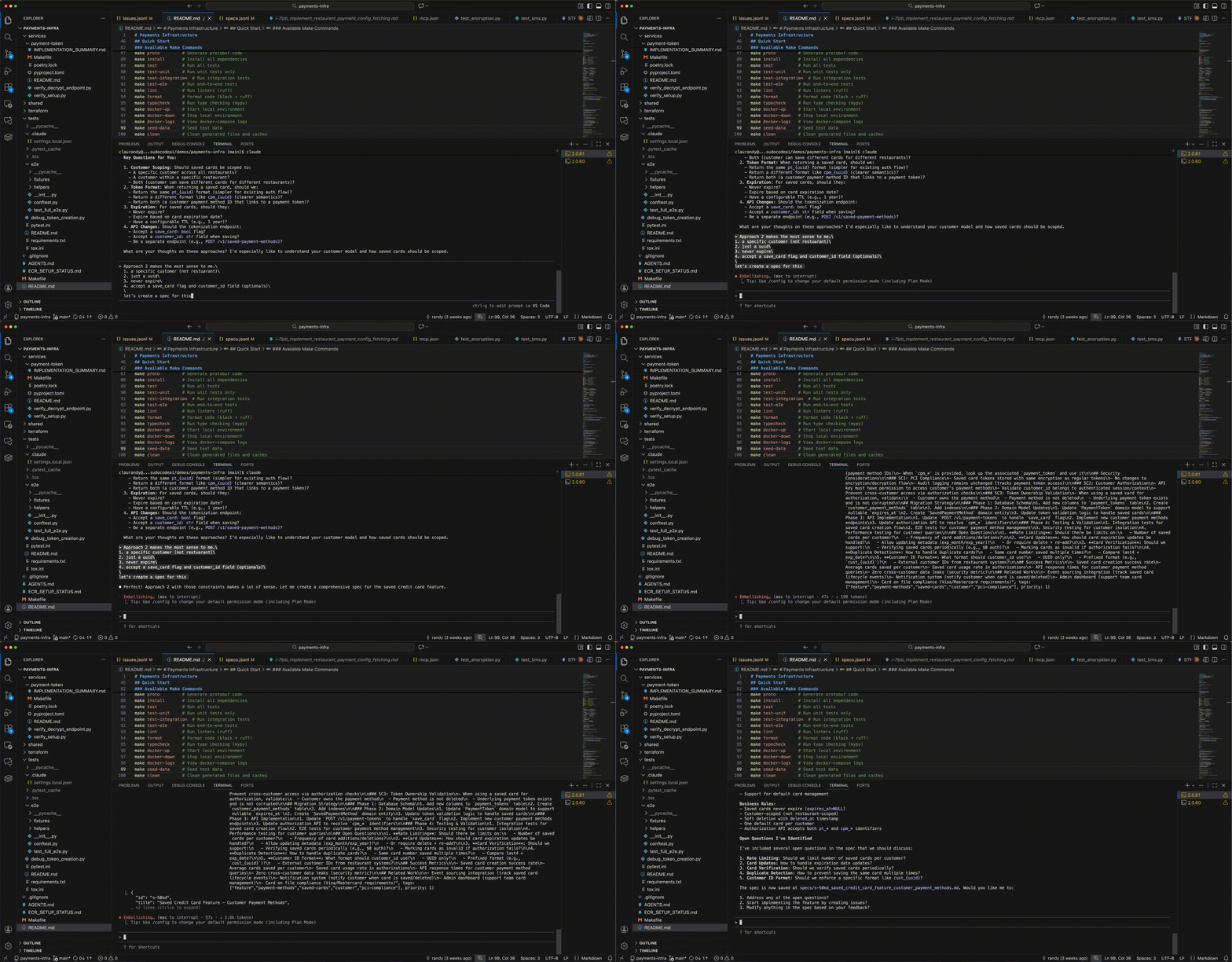 ```
⏺ Perfect! Approach 2 with those constraints makes a lot of sense.
Let me create a comprehensive spec for the saved credit card feature.
⏺ plugin:sudocode:sudocode - upsert_spec (MCP)
(title: "Saved Credit Card Feature - Customer Payment Methods",
description: "# Saved Credit Card Feature...
...comprehensive spec content...)
⎿ { "id": "s-50kd", ... }
⏺ Perfect! I've created a comprehensive specification for the saved
credit card feature. The spec is now saved at
specs/s-50kd_saved_credit_card_feature_customer_payment_methods.md
```
**Step 6: Inspect the specification in web UI**
```
⏺ Perfect! Approach 2 with those constraints makes a lot of sense.
Let me create a comprehensive spec for the saved credit card feature.
⏺ plugin:sudocode:sudocode - upsert_spec (MCP)
(title: "Saved Credit Card Feature - Customer Payment Methods",
description: "# Saved Credit Card Feature...
...comprehensive spec content...)
⎿ { "id": "s-50kd", ... }
⏺ Perfect! I've created a comprehensive specification for the saved
credit card feature. The spec is now saved at
specs/s-50kd_saved_credit_card_feature_customer_payment_methods.md
```
**Step 6: Inspect the specification in web UI**
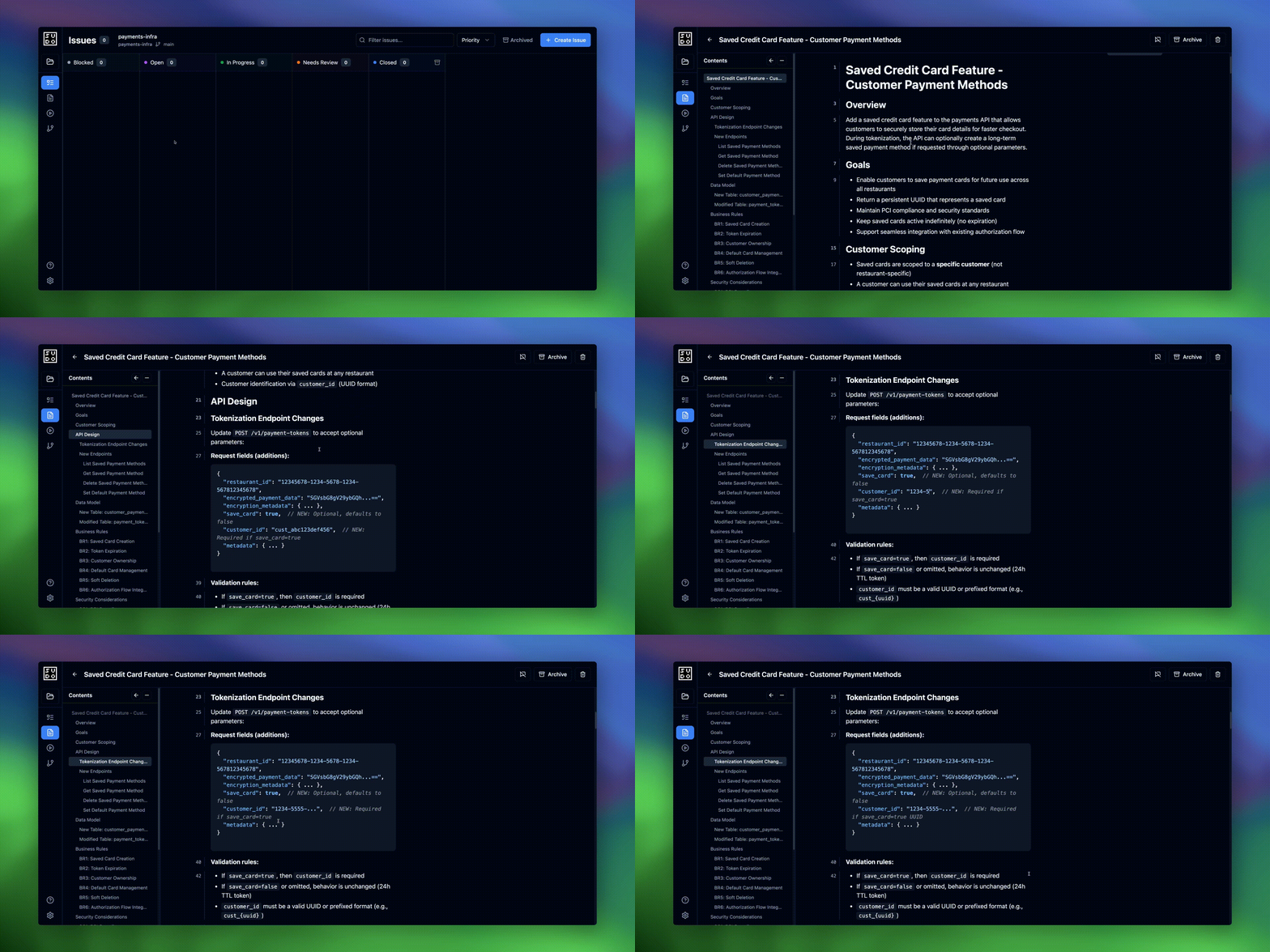 Open `localhost:3000` in your browser to review the spec visually:
* See the full spec with rendered markdown
* Review the data model, API design, and business rules
* Leave feedback or make edits as needed
* Update the spec based on any refinements
### Phase 2: Generate Implementation Plan
**Step 7: Agent breaks down spec into issues**
Open `localhost:3000` in your browser to review the spec visually:
* See the full spec with rendered markdown
* Review the data model, API design, and business rules
* Leave feedback or make edits as needed
* Update the spec based on any refinements
### Phase 2: Generate Implementation Plan
**Step 7: Agent breaks down spec into issues**
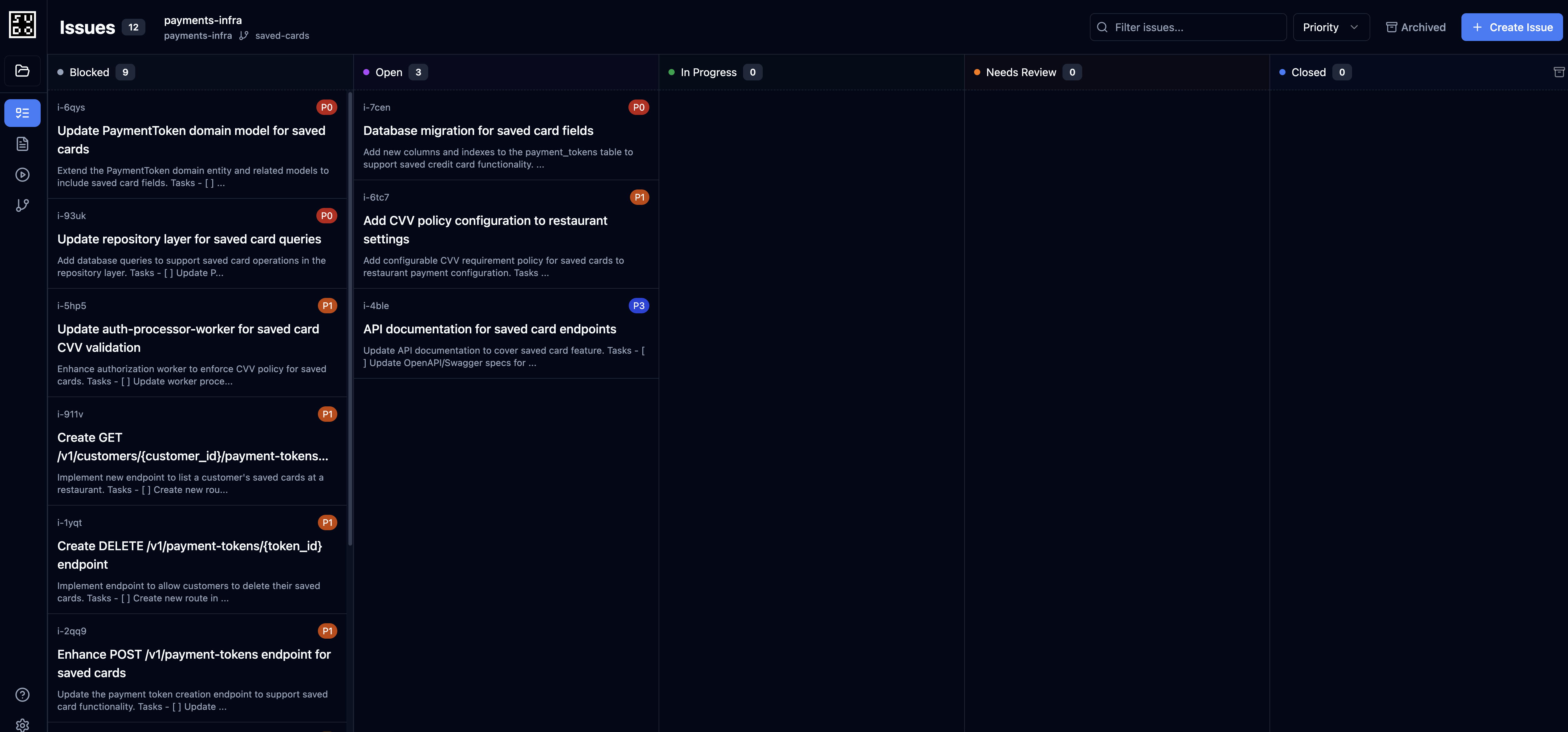 ```
> Great. We left some feedback on the spec, please re-read it.
Then, create issues for this spec.
⏺ plugin:sudocode:sudocode - show_spec (MCP)(spec_id: "s-50kd")
⎿ { "id": "s-50kd", ... }
⏺ I can see the spec has been updated with feedback. Now let me create
issues for implementing this spec based on the migration phases
outlined.
```
**Agent creates 8 issues following the spec's migration phases:**
```
⏺ plugin:sudocode:sudocode - upsert_issue (MCP)
(title: "Database schema migration for saved payment methods", ...)
⎿ { "id": "i-46dk", ... }
⏺ plugin:sudocode:sudocode - upsert_issue (MCP)
(title: "Create SavedPaymentMethod domain entity...", ...)
⎿ { "id": "i-78a9", ... }
⏺ plugin:sudocode:sudocode - upsert_issue (MCP)
(title: "Create repository methods for saved payment methods", ...)
⎿ { "id": "i-923i", ... }
⏺ plugin:sudocode:sudocode - upsert_issue (MCP)
(title: "Update token creation endpoint to support save_card flag", ...)
⎿ { "id": "i-2vsy", ... }
⏺ plugin:sudocode:sudocode - upsert_issue (MCP)
(title: "Implement customer payment methods management endpoints", ...)
⎿ { "id": "i-4xwd", ... }
⏺ plugin:sudocode:sudocode - upsert_issue (MCP)
(title: "Update authorization API to support cpm_* payment method IDs", ...)
⎿ { "id": "i-3iy5", ... }
⏺ plugin:sudocode:sudocode - upsert_issue (MCP)
(title: "Comprehensive testing for saved payment methods", ...)
⎿ { "id": "i-7klo", ... }
⏺ plugin:sudocode:sudocode - upsert_issue (MCP)
(title: "Update frontend demo to support saved cards", ...)
⎿ { "id": "i-4da3", ... }
```
```
⏺ Excellent! I've created 8 issues that implement the saved credit card
feature based on the spec. Here's the breakdown:
Phase 1: Database (Priority 0)
- i-46dk: Database schema migration
Phase 2: Domain Layer (Priority 0)
- i-78a9: Domain entity and model updates
- i-923i: Repository methods
Phase 3: API Implementation (Priority 1)
- i-2vsy: Token creation endpoint updates
- i-4xwd: Customer payment methods endpoints
- i-3iy5: Authorization API cpm_* support
Phase 4: Testing & Demo (Priority 2)
- i-7klo: Comprehensive testing
- i-4da3: Frontend demo updates
All issues are now linked to spec s-50kd with the "implements"
relationship.
```
**Step 8: Agent creates dependency relationships**
```
> Can you create dependencies between these issues?
⏺ plugin:sudocode:sudocode - link (MCP)
(from_id: "i-46dk", to_id: "i-78a9", type: "blocks")
⏺ plugin:sudocode:sudocode - link (MCP)
(from_id: "i-78a9", to_id: "i-923i", type: "blocks")
⏺ plugin:sudocode:sudocode - link (MCP)
(from_id: "i-923i", to_id: "i-2vsy", type: "blocks")
... [agent creates full dependency graph] ...
⏺ Perfect! I've created the dependency chain between all issues.
Here's the dependency graph:
i-46dk (Database migration)
↓ blocks
i-78a9 (Domain models)
↓ blocks
i-923i (Repository layer)
↓ blocks (splits into parallel)
├─→ i-2vsy (Token creation endpoint)
└─→ i-4xwd (Customer endpoints)
both block ↓
i-3iy5 (Authorization API)
↓ blocks (parallel)
i-7klo (Testing) + i-4da3 (Frontend demo)
```
**Step 9: Inspect issues in web UI and modify as needed**
```
> Great. We left some feedback on the spec, please re-read it.
Then, create issues for this spec.
⏺ plugin:sudocode:sudocode - show_spec (MCP)(spec_id: "s-50kd")
⎿ { "id": "s-50kd", ... }
⏺ I can see the spec has been updated with feedback. Now let me create
issues for implementing this spec based on the migration phases
outlined.
```
**Agent creates 8 issues following the spec's migration phases:**
```
⏺ plugin:sudocode:sudocode - upsert_issue (MCP)
(title: "Database schema migration for saved payment methods", ...)
⎿ { "id": "i-46dk", ... }
⏺ plugin:sudocode:sudocode - upsert_issue (MCP)
(title: "Create SavedPaymentMethod domain entity...", ...)
⎿ { "id": "i-78a9", ... }
⏺ plugin:sudocode:sudocode - upsert_issue (MCP)
(title: "Create repository methods for saved payment methods", ...)
⎿ { "id": "i-923i", ... }
⏺ plugin:sudocode:sudocode - upsert_issue (MCP)
(title: "Update token creation endpoint to support save_card flag", ...)
⎿ { "id": "i-2vsy", ... }
⏺ plugin:sudocode:sudocode - upsert_issue (MCP)
(title: "Implement customer payment methods management endpoints", ...)
⎿ { "id": "i-4xwd", ... }
⏺ plugin:sudocode:sudocode - upsert_issue (MCP)
(title: "Update authorization API to support cpm_* payment method IDs", ...)
⎿ { "id": "i-3iy5", ... }
⏺ plugin:sudocode:sudocode - upsert_issue (MCP)
(title: "Comprehensive testing for saved payment methods", ...)
⎿ { "id": "i-7klo", ... }
⏺ plugin:sudocode:sudocode - upsert_issue (MCP)
(title: "Update frontend demo to support saved cards", ...)
⎿ { "id": "i-4da3", ... }
```
```
⏺ Excellent! I've created 8 issues that implement the saved credit card
feature based on the spec. Here's the breakdown:
Phase 1: Database (Priority 0)
- i-46dk: Database schema migration
Phase 2: Domain Layer (Priority 0)
- i-78a9: Domain entity and model updates
- i-923i: Repository methods
Phase 3: API Implementation (Priority 1)
- i-2vsy: Token creation endpoint updates
- i-4xwd: Customer payment methods endpoints
- i-3iy5: Authorization API cpm_* support
Phase 4: Testing & Demo (Priority 2)
- i-7klo: Comprehensive testing
- i-4da3: Frontend demo updates
All issues are now linked to spec s-50kd with the "implements"
relationship.
```
**Step 8: Agent creates dependency relationships**
```
> Can you create dependencies between these issues?
⏺ plugin:sudocode:sudocode - link (MCP)
(from_id: "i-46dk", to_id: "i-78a9", type: "blocks")
⏺ plugin:sudocode:sudocode - link (MCP)
(from_id: "i-78a9", to_id: "i-923i", type: "blocks")
⏺ plugin:sudocode:sudocode - link (MCP)
(from_id: "i-923i", to_id: "i-2vsy", type: "blocks")
... [agent creates full dependency graph] ...
⏺ Perfect! I've created the dependency chain between all issues.
Here's the dependency graph:
i-46dk (Database migration)
↓ blocks
i-78a9 (Domain models)
↓ blocks
i-923i (Repository layer)
↓ blocks (splits into parallel)
├─→ i-2vsy (Token creation endpoint)
└─→ i-4xwd (Customer endpoints)
both block ↓
i-3iy5 (Authorization API)
↓ blocks (parallel)
i-7klo (Testing) + i-4da3 (Frontend demo)
```
**Step 9: Inspect issues in web UI and modify as needed**
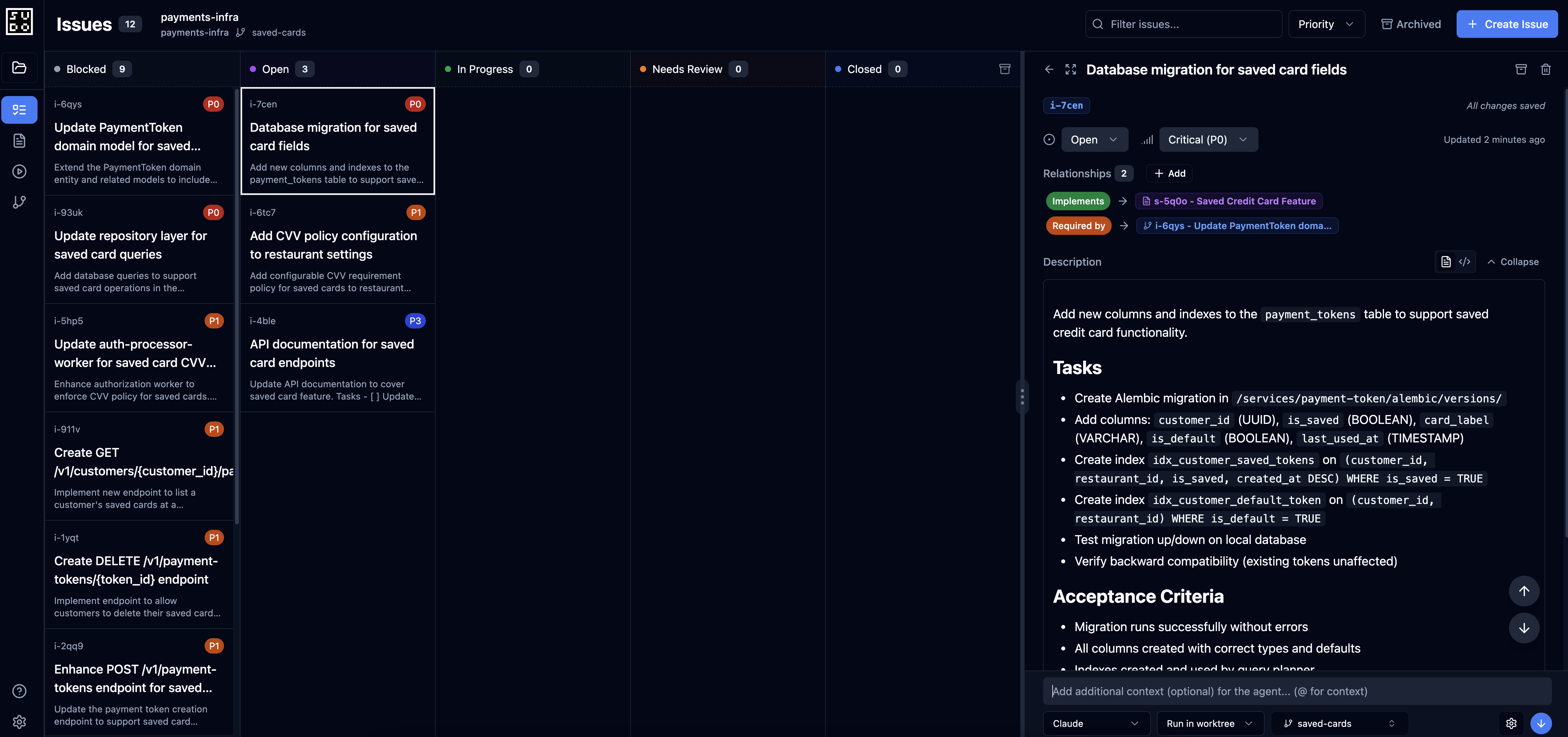 Open `localhost:3000` and navigate to the Issues board:
* Review all 8 issues created by the agent
* Check priorities and dependencies
* Modify issue descriptions if needed
* Verify the dependency graph makes sense
### Phase 3: Execute Issues
**Before dispatching agents:** Commit any uncommitted changes in your repository. The web UI creates worktrees for agent execution, and worktrees require a clean working directory.
```bash theme={null}
git add .
git commit -m "Add saved card spec and implementation plan"
```
**Step 10: Execute issues on worktree**
Open `localhost:3000` and navigate to the Issues board:
* Review all 8 issues created by the agent
* Check priorities and dependencies
* Modify issue descriptions if needed
* Verify the dependency graph makes sense
### Phase 3: Execute Issues
**Before dispatching agents:** Commit any uncommitted changes in your repository. The web UI creates worktrees for agent execution, and worktrees require a clean working directory.
```bash theme={null}
git add .
git commit -m "Add saved card spec and implementation plan"
```
**Step 10: Execute issues on worktree**
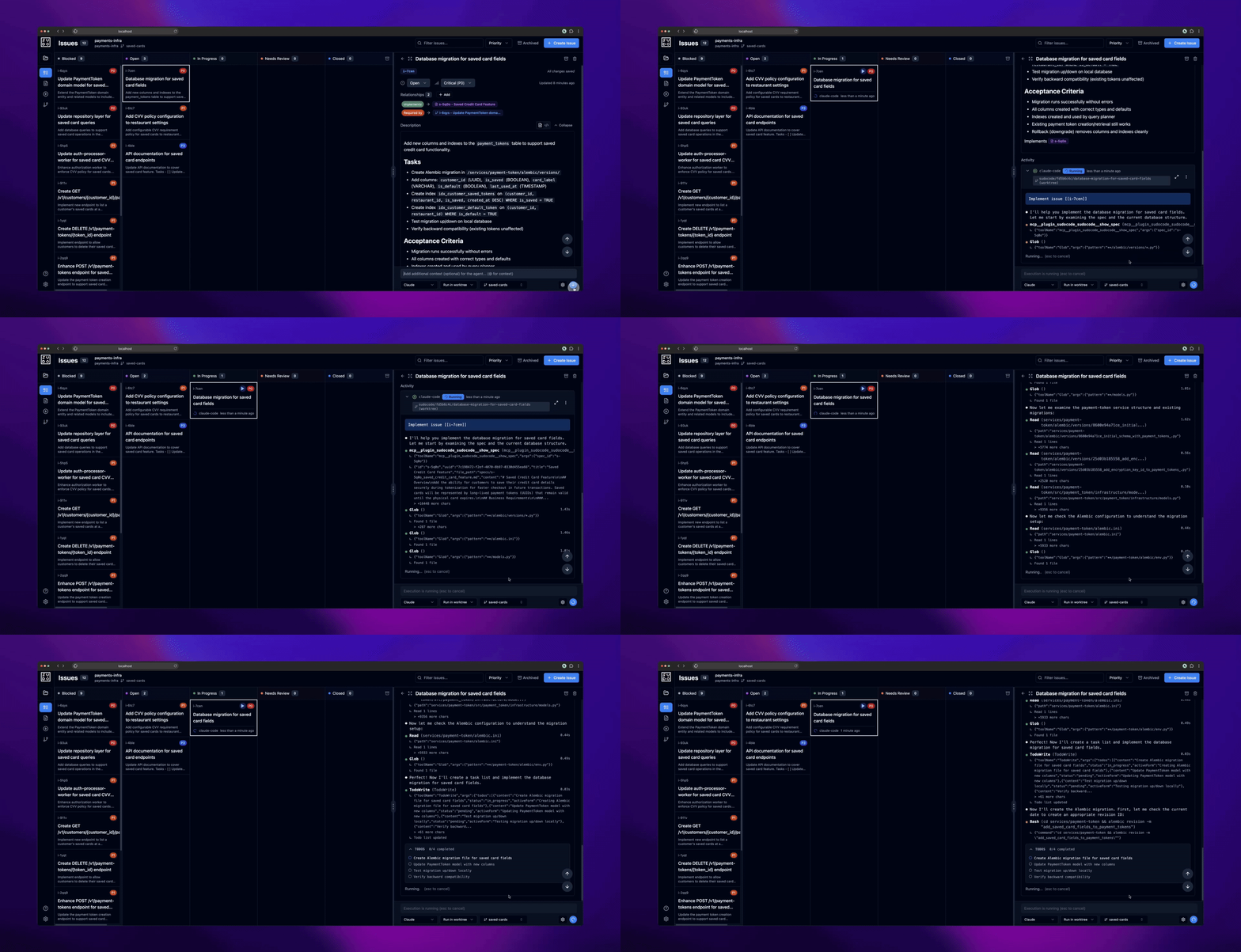 Click on an issue dispatch button to run it in a worktree.
**Step 11: Review and merge worktree changes**
Click on an issue dispatch button to run it in a worktree.
**Step 11: Review and merge worktree changes**
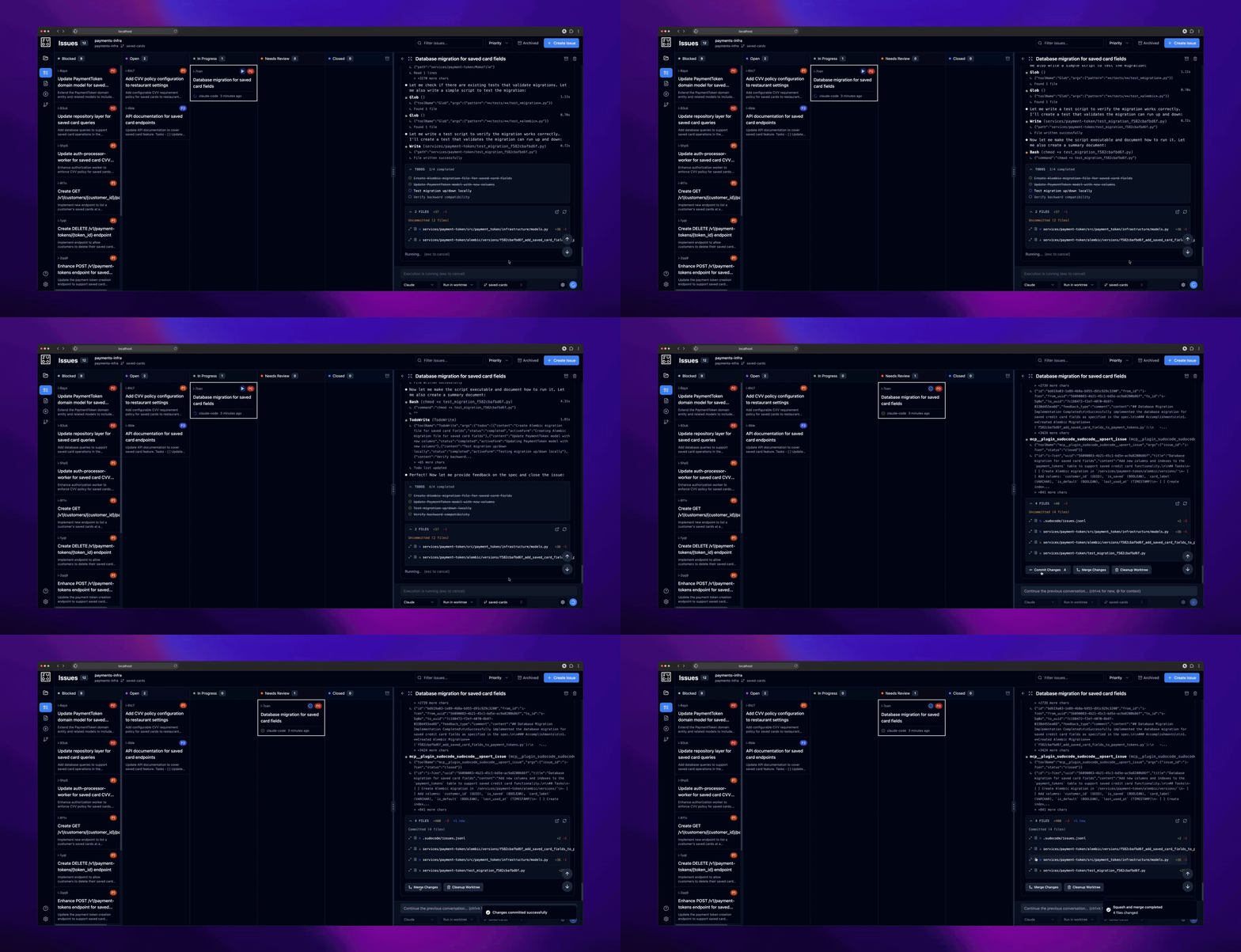 After an agent completes work in a worktree, review the changes and click the "Merge Worktree" button. This will:
1. Commit any uncommitted changes in the worktree
2. Squash and merge the worktree commits to your main branch
You can then commit the merged changes to accept the agent's work into your branch.
As agents work, they may also provide feedback on the spec to surface ambiguities or suggest improvements.
### Phase 4: Completion
**All issues completed:**
After an agent completes work in a worktree, review the changes and click the "Merge Worktree" button. This will:
1. Commit any uncommitted changes in the worktree
2. Squash and merge the worktree commits to your main branch
You can then commit the merged changes to accept the agent's work into your branch.
As agents work, they may also provide feedback on the spec to surface ambiguities or suggest improvements.
### Phase 4: Completion
**All issues completed:**
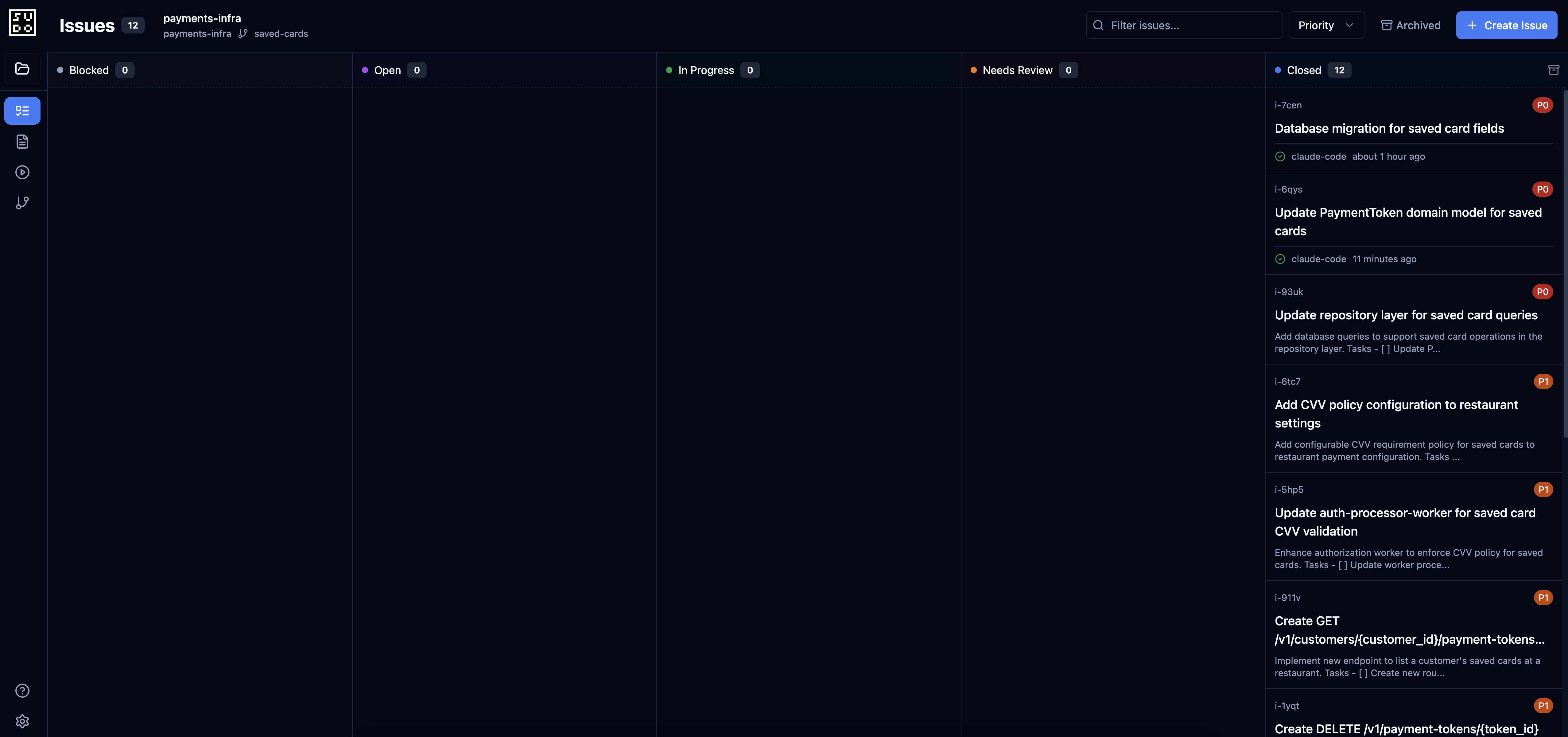 All issues done! Feel free to inspect the various issues and spec feedback, and review the final implementation before deploying!
## Best Practices
Start by describing what you want to build, then collaborate with your agent to design it.
**Approach:**
```
You: "I want to add [feature]. Let's think about how to implement this."
Agent: [Explores codebase, proposes approaches, discusses trade-offs]
You: [Provide decisions, answer questions, guide design]
You: "Approach 2 makes sense. Create a spec for this."
Agent: [Uses upsert_spec() MCP tool to create specification]
```
**Tips:**
* Provide context about constraints and requirements
* Discuss trade-offs before committing to an approach
* Let agents explore the codebase to understand existing patterns
* Review the spec in the web UI and refine as needed
**Benefits:**
* Leverages agent's codebase knowledge
* Captures design decisions early
* Creates shared understanding
* Results in actionable, contextual specs
Open `localhost:3000` to review and manage your work visually.
**What to review:**
* **Specs**: View rendered markdown, leave feedback, edit content
* **Issues board**: See ready/in-progress/blocked/completed work
* **Dependencies**: Visualize the dependency graph
* **Feedback**: Review agent feedback on specs with line anchors
* **Worktrees**: Monitor agent execution and merge results
**Benefits:**
* Better understanding of project state
* Easier to spot issues in the dependency graph
* More natural way to read and edit specs
* Visual feedback on progress
Don't try to specify everything upfront. Start with:
* Core requirements
* Key constraints
* Open questions
Let implementation reality inform refinements.
**Example:**
```
Draft: "Build user authentication"
v1: "OAuth 2.0 with Google/GitHub"
v2: Add token expiration details from agent feedback
v3: Add security requirements from implementation learnings
```
Issues should be agent-scoped: completable in one session.
**Too large:**
```
❌ "Build complete authentication system"
```
**Right size:**
```
✅ "Configure OAuth providers"
✅ "Implement token exchange"
✅ "Add PKCE security"
```
Benefits:
* Parallel work possible
* Clear completion criteria
* Easy to track progress
* Reduces blocking
After agents create issues, ask them to establish dependency relationships.
**Example:**
```
You: "Can you create dependencies between these issues?"
Agent: [Uses link() MCP tool to create blocks relationships]
```
Review the dependency graph in the web UI to ensure:
* Foundation work blocks dependent work
* Parallel work is properly independent
* No circular dependencies exist
**Benefits:**
* Automatic `ready()` filtering
* Parallel work discovery
* Bottleneck identification
* Clear execution order
When an agent completes work in a worktree, review before merging.
**Workflow:**
1. Agent completes issue in isolated worktree
2. Review the changes in the worktree and commit
3. Click "Merge Worktree" button in web UI
4. Commit the merged changes to your branch
**What to check:**
* Implementation matches spec requirements
* Code quality and test coverage
* No unintended changes or side effects
* Agent feedback on spec is addressed
**Benefits:**
* Maintain code quality
* Catch issues early
* Keep main branch clean
* Learn from agent implementation choices
After merging a worktree, commit the changes to your branch immediately.
```bash theme={null}
# After clicking "Merge Worktree" button
git add .
git commit -m "Implement database schema for saved payment methods (i-46dk)
- Created saved_payment_methods table
- Added indexes for customer lookups
- Set up UUID primary keys
"
```
**Benefits:**
* Clean git history
* Easy to track which issue each commit addresses
* Context preserved for future reference
* Enables rolling back individual features if needed
## Common Patterns
### Pattern: Spec-First Feature Development
```
# 1. Human describes feature to agent
You: "I want to add [feature description]. Let's design this together."
# 2. Agent explores codebase and proposes approaches
Agent uses MCP tools to understand existing architecture
# 3. Human and agent co-create spec
You: "Approach 2 makes sense. Create a spec for this."
Agent: [Uses upsert_spec() MCP tool to create specification]
# 4. Agent breaks down spec into issues
You: "Create issues for this spec."
Agent: [Uses upsert_issue() and link() to create implementation plan]
# 5. Agents execute issues in dependency order
Dispatch agents from web UI or via MCP ready() queries
# 6. Agents provide feedback during implementation
Agent: [Uses add_feedback() to surface ambiguities]
# 7. Human refines spec based on feedback
Review feedback in web UI, edit spec markdown as needed
# 8. Merge worktree changes as issues complete
Click "Merge Worktree" button to accept agent's work
# 9. New issues created if needed
Agent discovers additional work during implementation
# 10. All issues completed, feature ready for review!
```
### Pattern: Multi-Agent Parallel Development
Dispatch multiple agents in parallel using worktrees:
```
ISSUE-001: Database schema migration
ISSUE-002: Domain model updates
ISSUE-003: Business logic implementation
ISSUE-004: API endpoint creation
```
### Pattern: Feedback-Driven Spec Refinement
```
Iteration 1:
Spec: "Build search feature"
Agent: Implements basic search
Feedback: "Ranking algorithm not specified"
Iteration 2:
Spec updated: "Use TF-IDF for ranking"
Agent: Implements TF-IDF
Feedback: "Performance on large datasets?"
Iteration 3:
Spec updated: "Target: <100ms for 10M documents"
Agent: Optimizes with caching
Complete!
```
### Pattern: Hierarchical Spec Organization
```
SPEC-001: E-commerce Platform (epic)
├─ SPEC-002: Product Catalog
│ ├─ ISSUE-010: Product model
│ ├─ ISSUE-011: Search API
│ └─ ISSUE-012: Product images
├─ SPEC-003: Shopping Cart
│ ├─ ISSUE-020: Cart model
│ ├─ ISSUE-021: Add to cart
│ └─ ISSUE-022: Checkout flow
└─ SPEC-004: Payment Integration
├─ ISSUE-030: Stripe setup
└─ ISSUE-031: Payment flow
```
## Troubleshooting
**Cause:** Circular dependencies or all work depends on blocked items
**Solution:**
Work with your agent to investigate the blocking chain:
```
You: "Nothing is ready to work on. Can you check what's blocking the issues?"
Agent: [Reviews dependency graph using list_issues()]
Agent: "I found the issue. ISSUE-008 is blocked by an external dependency
that hasn't been created as an issue yet. The chain is:
- ISSUE-010 blocked by ISSUE-009
- ISSUE-009 blocked by ISSUE-008
- ISSUE-008 needs external API integration first
Should I create an issue for the external API integration?"
You: "Yes, create that issue and link it properly."
Agent: [Creates blocking issue and establishes proper dependency chain]
```
**For circular dependencies:**
Collaborate with your agent to identify and break the cycle:
```
You: "Nothing is ready. Can you check if there are circular dependencies?"
Agent: "Yes, I found a circular dependency:
- i-abc123 (Database schema) blocks i-def456 (API endpoints)
- i-def456 (API endpoints) blocks i-abc123 (Database schema)
These shouldn't both block each other. Which one should happen first?"
You: "The database schema should come first. We need the tables before
we can build API endpoints that use them."
Agent: "Got it. I'll remove the dependency from i-def456 to i-abc123,
keeping only the correct direction: database → API."
Agent: [Removes incorrect link, i-abc123 becomes ready]
```
Alternatively, you might need to create an intermediate issue:
```
You: "Actually, both need a shared configuration file first. Can you
create a new issue for that?"
Agent: "I'll create i-xyz789 for the configuration file and have it
block both database and API work."
Agent: [Creates new issue, establishes proper dependency chain]
```
**Cause:** Over-planning before implementation learnings
**Solution:**
Break large specs into smaller sub-specs for iterative planning:
```
You: "This spec is too large. Can you break it into smaller sub-specs
that we can tackle incrementally?"
Agent: [Uses upsert_spec() with parent parameter to create hierarchy]
```
**Approach:**
* Create only foundation issues for the first sub-spec
* Let agents discover additional work during implementation
* Use `discovered-from` relationship for issues found during work
* Create new sub-specs as you learn more about requirements
* Allow specs to evolve based on implementation reality
**Benefits:**
* Reduces upfront planning burden
* Adapts to learnings during implementation
* Keeps issues focused and actionable
* Enables parallel work on independent sub-specs
**Cause:** Multiple worktrees modified issues or specs simultaneously
**Solution:**
When merging a worktree introduces conflicts in `.sudocode/issues.jsonl` or `.sudocode/specs.jsonl`:
```bash theme={null}
# Run the sudocode CLI conflict resolver
sudocode resolve-conflicts
# This will:
# 1. Parse both versions of the conflicting files
# 2. Intelligently merge the changes
# 3. Preserve all issue and spec updates
# 4. Update the files with resolved content
```
Then commit the resolved changes:
```bash theme={null}
git add .sudocode/
git commit -m "Resolve sudocode conflicts from worktree merge"
```
**Prevention tips:**
* Commit and merge worktrees promptly after completion
* Avoid having multiple agents modify the same issues simultaneously
* Use the web UI to monitor which issues are in progress
**Cause:** Large spec refactorings move content
**Solution:**
```bash theme={null}
# Find stale feedback
sudocode feedback stale
# Output:
# FEEDBACK-001 on SPEC-005:23 (stale - line moved)
# Relocate manually if needed
sudocode feedback relocate FEEDBACK-001 --line 45
# Or dismiss if no longer relevant
sudocode feedback dismiss FEEDBACK-001 --comment "Spec restructured, no longer applicable"
```
## Related Documentation
Deep dive into specifications
Anchored feedback mechanics
MCP workflow examples
Dependency graph concepts
AI agent integration
All issues done! Feel free to inspect the various issues and spec feedback, and review the final implementation before deploying!
## Best Practices
Start by describing what you want to build, then collaborate with your agent to design it.
**Approach:**
```
You: "I want to add [feature]. Let's think about how to implement this."
Agent: [Explores codebase, proposes approaches, discusses trade-offs]
You: [Provide decisions, answer questions, guide design]
You: "Approach 2 makes sense. Create a spec for this."
Agent: [Uses upsert_spec() MCP tool to create specification]
```
**Tips:**
* Provide context about constraints and requirements
* Discuss trade-offs before committing to an approach
* Let agents explore the codebase to understand existing patterns
* Review the spec in the web UI and refine as needed
**Benefits:**
* Leverages agent's codebase knowledge
* Captures design decisions early
* Creates shared understanding
* Results in actionable, contextual specs
Open `localhost:3000` to review and manage your work visually.
**What to review:**
* **Specs**: View rendered markdown, leave feedback, edit content
* **Issues board**: See ready/in-progress/blocked/completed work
* **Dependencies**: Visualize the dependency graph
* **Feedback**: Review agent feedback on specs with line anchors
* **Worktrees**: Monitor agent execution and merge results
**Benefits:**
* Better understanding of project state
* Easier to spot issues in the dependency graph
* More natural way to read and edit specs
* Visual feedback on progress
Don't try to specify everything upfront. Start with:
* Core requirements
* Key constraints
* Open questions
Let implementation reality inform refinements.
**Example:**
```
Draft: "Build user authentication"
v1: "OAuth 2.0 with Google/GitHub"
v2: Add token expiration details from agent feedback
v3: Add security requirements from implementation learnings
```
Issues should be agent-scoped: completable in one session.
**Too large:**
```
❌ "Build complete authentication system"
```
**Right size:**
```
✅ "Configure OAuth providers"
✅ "Implement token exchange"
✅ "Add PKCE security"
```
Benefits:
* Parallel work possible
* Clear completion criteria
* Easy to track progress
* Reduces blocking
After agents create issues, ask them to establish dependency relationships.
**Example:**
```
You: "Can you create dependencies between these issues?"
Agent: [Uses link() MCP tool to create blocks relationships]
```
Review the dependency graph in the web UI to ensure:
* Foundation work blocks dependent work
* Parallel work is properly independent
* No circular dependencies exist
**Benefits:**
* Automatic `ready()` filtering
* Parallel work discovery
* Bottleneck identification
* Clear execution order
When an agent completes work in a worktree, review before merging.
**Workflow:**
1. Agent completes issue in isolated worktree
2. Review the changes in the worktree and commit
3. Click "Merge Worktree" button in web UI
4. Commit the merged changes to your branch
**What to check:**
* Implementation matches spec requirements
* Code quality and test coverage
* No unintended changes or side effects
* Agent feedback on spec is addressed
**Benefits:**
* Maintain code quality
* Catch issues early
* Keep main branch clean
* Learn from agent implementation choices
After merging a worktree, commit the changes to your branch immediately.
```bash theme={null}
# After clicking "Merge Worktree" button
git add .
git commit -m "Implement database schema for saved payment methods (i-46dk)
- Created saved_payment_methods table
- Added indexes for customer lookups
- Set up UUID primary keys
"
```
**Benefits:**
* Clean git history
* Easy to track which issue each commit addresses
* Context preserved for future reference
* Enables rolling back individual features if needed
## Common Patterns
### Pattern: Spec-First Feature Development
```
# 1. Human describes feature to agent
You: "I want to add [feature description]. Let's design this together."
# 2. Agent explores codebase and proposes approaches
Agent uses MCP tools to understand existing architecture
# 3. Human and agent co-create spec
You: "Approach 2 makes sense. Create a spec for this."
Agent: [Uses upsert_spec() MCP tool to create specification]
# 4. Agent breaks down spec into issues
You: "Create issues for this spec."
Agent: [Uses upsert_issue() and link() to create implementation plan]
# 5. Agents execute issues in dependency order
Dispatch agents from web UI or via MCP ready() queries
# 6. Agents provide feedback during implementation
Agent: [Uses add_feedback() to surface ambiguities]
# 7. Human refines spec based on feedback
Review feedback in web UI, edit spec markdown as needed
# 8. Merge worktree changes as issues complete
Click "Merge Worktree" button to accept agent's work
# 9. New issues created if needed
Agent discovers additional work during implementation
# 10. All issues completed, feature ready for review!
```
### Pattern: Multi-Agent Parallel Development
Dispatch multiple agents in parallel using worktrees:
```
ISSUE-001: Database schema migration
ISSUE-002: Domain model updates
ISSUE-003: Business logic implementation
ISSUE-004: API endpoint creation
```
### Pattern: Feedback-Driven Spec Refinement
```
Iteration 1:
Spec: "Build search feature"
Agent: Implements basic search
Feedback: "Ranking algorithm not specified"
Iteration 2:
Spec updated: "Use TF-IDF for ranking"
Agent: Implements TF-IDF
Feedback: "Performance on large datasets?"
Iteration 3:
Spec updated: "Target: <100ms for 10M documents"
Agent: Optimizes with caching
Complete!
```
### Pattern: Hierarchical Spec Organization
```
SPEC-001: E-commerce Platform (epic)
├─ SPEC-002: Product Catalog
│ ├─ ISSUE-010: Product model
│ ├─ ISSUE-011: Search API
│ └─ ISSUE-012: Product images
├─ SPEC-003: Shopping Cart
│ ├─ ISSUE-020: Cart model
│ ├─ ISSUE-021: Add to cart
│ └─ ISSUE-022: Checkout flow
└─ SPEC-004: Payment Integration
├─ ISSUE-030: Stripe setup
└─ ISSUE-031: Payment flow
```
## Troubleshooting
**Cause:** Circular dependencies or all work depends on blocked items
**Solution:**
Work with your agent to investigate the blocking chain:
```
You: "Nothing is ready to work on. Can you check what's blocking the issues?"
Agent: [Reviews dependency graph using list_issues()]
Agent: "I found the issue. ISSUE-008 is blocked by an external dependency
that hasn't been created as an issue yet. The chain is:
- ISSUE-010 blocked by ISSUE-009
- ISSUE-009 blocked by ISSUE-008
- ISSUE-008 needs external API integration first
Should I create an issue for the external API integration?"
You: "Yes, create that issue and link it properly."
Agent: [Creates blocking issue and establishes proper dependency chain]
```
**For circular dependencies:**
Collaborate with your agent to identify and break the cycle:
```
You: "Nothing is ready. Can you check if there are circular dependencies?"
Agent: "Yes, I found a circular dependency:
- i-abc123 (Database schema) blocks i-def456 (API endpoints)
- i-def456 (API endpoints) blocks i-abc123 (Database schema)
These shouldn't both block each other. Which one should happen first?"
You: "The database schema should come first. We need the tables before
we can build API endpoints that use them."
Agent: "Got it. I'll remove the dependency from i-def456 to i-abc123,
keeping only the correct direction: database → API."
Agent: [Removes incorrect link, i-abc123 becomes ready]
```
Alternatively, you might need to create an intermediate issue:
```
You: "Actually, both need a shared configuration file first. Can you
create a new issue for that?"
Agent: "I'll create i-xyz789 for the configuration file and have it
block both database and API work."
Agent: [Creates new issue, establishes proper dependency chain]
```
**Cause:** Over-planning before implementation learnings
**Solution:**
Break large specs into smaller sub-specs for iterative planning:
```
You: "This spec is too large. Can you break it into smaller sub-specs
that we can tackle incrementally?"
Agent: [Uses upsert_spec() with parent parameter to create hierarchy]
```
**Approach:**
* Create only foundation issues for the first sub-spec
* Let agents discover additional work during implementation
* Use `discovered-from` relationship for issues found during work
* Create new sub-specs as you learn more about requirements
* Allow specs to evolve based on implementation reality
**Benefits:**
* Reduces upfront planning burden
* Adapts to learnings during implementation
* Keeps issues focused and actionable
* Enables parallel work on independent sub-specs
**Cause:** Multiple worktrees modified issues or specs simultaneously
**Solution:**
When merging a worktree introduces conflicts in `.sudocode/issues.jsonl` or `.sudocode/specs.jsonl`:
```bash theme={null}
# Run the sudocode CLI conflict resolver
sudocode resolve-conflicts
# This will:
# 1. Parse both versions of the conflicting files
# 2. Intelligently merge the changes
# 3. Preserve all issue and spec updates
# 4. Update the files with resolved content
```
Then commit the resolved changes:
```bash theme={null}
git add .sudocode/
git commit -m "Resolve sudocode conflicts from worktree merge"
```
**Prevention tips:**
* Commit and merge worktrees promptly after completion
* Avoid having multiple agents modify the same issues simultaneously
* Use the web UI to monitor which issues are in progress
**Cause:** Large spec refactorings move content
**Solution:**
```bash theme={null}
# Find stale feedback
sudocode feedback stale
# Output:
# FEEDBACK-001 on SPEC-005:23 (stale - line moved)
# Relocate manually if needed
sudocode feedback relocate FEEDBACK-001 --line 45
# Or dismiss if no longer relevant
sudocode feedback dismiss FEEDBACK-001 --comment "Spec restructured, no longer applicable"
```
## Related Documentation
Deep dive into specifications
Anchored feedback mechanics
MCP workflow examples
Dependency graph concepts
AI agent integration