> ## Documentation Index
> Fetch the complete documentation index at: https://docs.sudocode.ai/llms.txt
> Use this file to discover all available pages before exploring further.
# Creating Issues
> How to create and organize issues with the sudocode MCP tools.
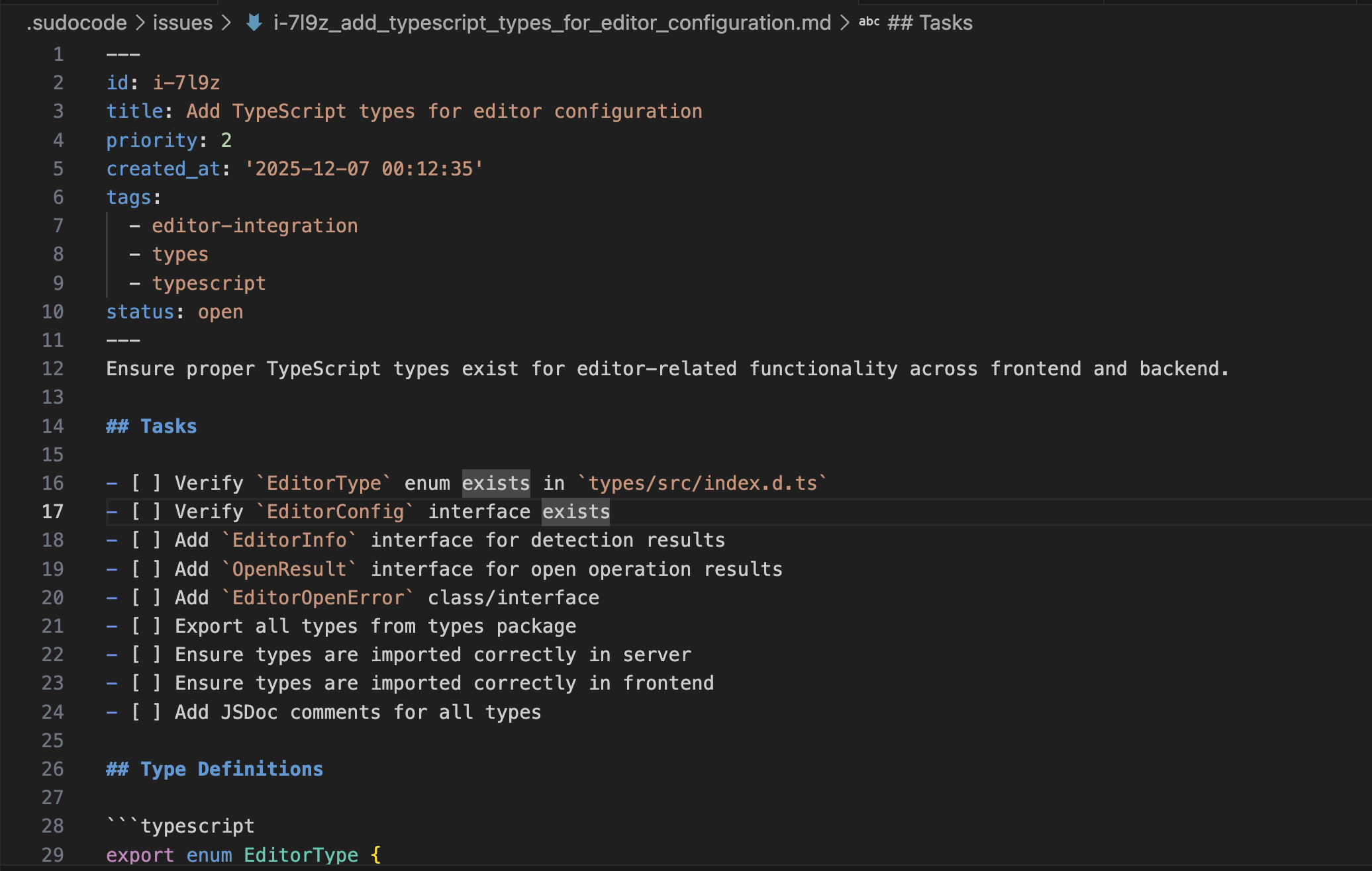
Issues are actionable work items that agents claim and complete. They represent implementation tasks that turn specifications into working code.
 ## When to Create an Issue
Create issues to track discrete, actionable work. Think of issues as your agent's work queue.
Break down specifications into discrete implementation tasks that agents can execute
Use issues to capture the dependency of work items and enforce execution order
Create discovery issues that leave behind other issues and specs as artifacts
**Don't create issues for:**
* Large, ambiguous goals without clear actionability
* Defining requirements for larger tasks (use specs instead)
* Temporary notes or reminders (use comments or external tools)
## How to Create an Issue
### Method 1: Spec-Driven Implementation
Create issues that implement specific sections or requirements from a spec.
```
> User: Could you take a look at spec [[s-abc123]] and break it down into issues?
⏺ Agent: I'll review the spec and create implementation issues.
⏺ plugin:sudocode:sudocode - show_spec (MCP)(spec_id: "s-abc123"...
[Agent reviews spec structure and requirements]
```
```
⏺ Agent: I've reviewed the spec. Let me break this into three focused issues:
1. Detect token expiration and trigger refresh
2. Implement refresh request flow with rotation
3. Handle error scenarios and fallback logic
Let me create these issues.
⏺ plugin:sudocode:sudocode - upsert_issue (MCP)(title: "Detect token
expiration and trigger refresh", description: "Implements [[s-abc123]]
section 2.1: Token Expiration Detection...", priority: 0...
⏺ Created i-xyz789. Now linking to spec...
⏺ plugin:sudocode:sudocode - link (MCP)(from_id: "i-xyz789",
to_id: "s-abc123", type: "implements"...
[Agent creates remaining issues and links them]
```
```
> User: Show me i-xyz789 to confirm it's linked.
⏺ Agent: Let me show you the issue details.
⏺ plugin:sudocode:sudocode - show_issue (MCP)(issue_id: "i-xyz789"...
⏺ Issue i-xyz789 shows it implements s-abc123 and includes references
to specific spec sections.
```
**Agent doesn't always create dependencies:** If you notice that the agent hasn't established dependency relationships between related issues, you can prompt it directly:
```
> User: Make sure that you capture the dependency between issues
⏺ plugin:sudocode:sudocode - link (MCP)(from_id: "i-7xqw",
to_id: "i-yy9c", type: "depends-on")
⎿ {
"from": "i-7xqw",
"to": "i-yy9c",
… +3 lines
⏺ Perfect! I've added all the dependency relationships between the
issues. Here's the dependency graph:
Dependency Structure
i-7l9z (TypeScript types)
↓
├─→ i-yy9c (EditorService)
```
**Best for:** Implementing well-defined specifications with clear requirements.
### Method 2: Breaking Down Large Issues
Take a large or complex issue (epic) and split it into smaller, manageable sub-issues.
```
> User: Issue i-big456 is too large to tackle at once. Can you break
this down into smaller pieces?
⏺ Agent: I'll review the issue and break it into sub-issues.
⏺ plugin:sudocode:sudocode - show_issue (MCP)(issue_id: "i-big456"...
[Agent analyzes the scope and complexity]
```
```
⏺ Agent: I can break i-big456 into 4 focused subtasks:
1. Database schema migration
2. API endpoint implementation
3. Frontend component updates
4. Integration tests
⏺ plugin:sudocode:sudocode - upsert_issue (MCP)(title: "Database schema
migration for user settings", parent: "i-big456", priority: 0...
⏺ Created i-sub001 as a child of i-big456.
[Agent creates remaining child issues]
```
```
⏺ Agent: The API work depends on the schema migration. Let me set up
that dependency.
⏺ plugin:sudocode:sudocode - link (MCP)(from_id: "i-sub002",
to_id: "i-sub001", type: "depends-on"...
⏺ Now i-sub002 won't show as ready until i-sub001 is closed.
```
**Best for:** Complex features that need to be broken into sequential or parallel work streams.
### Method 3: Discovery-Driven Issues
Create new issues when you discover unexpected work during implementation.
```
> User: While working on i-auth789, I noticed the password validation
is inconsistent across endpoints. Should we fix this?
⏺ Agent: That's a good catch. Let me create an issue to track this
improvement.
⏺ plugin:sudocode:sudocode - upsert_issue (MCP)(title: "Standardize
password validation across all endpoints", description: "Discovered
while implementing authentication...", priority: 2, tags: ["security",
"refactoring"]...
```
```
⏺ Agent: I'll link this to the issue where we discovered it.
⏺ plugin:sudocode:sudocode - link (MCP)(from_id: "i-new999",
to_id: "i-auth789", type: "discovered-from"...
⏺ Created i-new999 and linked it to i-auth789 to track provenance.
```
```
> User: This should be done before we ship authentication.
⏺ Agent: I'll mark it as blocking the authentication issue.
⏺ plugin:sudocode:sudocode - link (MCP)(from_id: "i-new999",
to_id: "i-auth789", type: "blocks"...
⏺ Now i-auth789 won't show as ready until i-new999 is closed.
```
**Best for:** Capturing emergent work, technical debt, or issues discovered during code review.
### Method 4: Standalone Ad-Hoc Work
Create individual issues for bugs, quick features, or tasks that don't relate to a spec.
```
> User: Create an issue to fix the broken link in the README.
⏺ Agent: I'll create a quick fix issue.
⏺ plugin:sudocode:sudocode - upsert_issue (MCP)(title: "Fix broken
documentation link in README", description: "Link to contributing guide
returns 404", priority: 3, tags: ["documentation", "quick-fix"]...
⏺ Created i-doc555 with low priority.
```
```
⏺ Agent: This is a quick fix. Let me handle it right now.
[Agent fixes the link]
⏺ plugin:sudocode:sudocode - upsert_issue (MCP)(issue_id: "i-doc555",
status: "closed"...
⏺ Closed i-doc555. The README link is now fixed.
```
**Best for:** Small bugs, typos, quick improvements, and isolated tasks.
## Organizing Issues
### Priority Levels
Priority levels help agents decide what to work on first
Ask an agent to set priority when creating or updating issues.
### Issue Hierarchies
Use parent-child relationships for issue breakdown:
```
i-epic001: Implement user authentication (parent)
├── i-sub001: Add password hashing with bcrypt (child)
├── i-sub002: Create login endpoint with JWT (child)
└── i-sub003: Add session management (child)
```
Simply ask an agent to create child issues with the parent parameter.
### Dependency Management
Define execution order using relationship types:
**blocks**: Hard blocker (B blocks A means A can't start until B is done)
```
i-schema001 blocks i-api001
```
**depends-on**: General dependency (A depends on B means B should finish first)
```
i-integration001 depends-on i-unit-tests001
```
Ask an agent to link issues with these relationships.
### Tagging
Use tags for categorization and filtering:
```
["backend", "authentication", "security"]
["frontend", "ui", "react"]
["database", "migration", "postgres"]
```
Agents automatically suggest tags based on content, but you can also specify them explicitly.
## Best Practices
Each issue should represent a single, cohesive piece of work.
**Good:**
```
Title: "Add rate limiting to login endpoint"
Description: Implement token bucket rate limiter on /api/login
- 5 attempts per 15 minutes per IP
- Return 429 with Retry-After header
```
**Bad:**
```
Title: "Improve API security"
Description: Add rate limiting, input validation, CORS, and audit logging
```
Always use the `implements` relationship to connect issues to specs.
**Why it matters:**
* Agents can reference spec requirements during implementation
* Agents can provide feedback on spec clarity
* You can track which specs are implemented vs. pending
**How:**
Ask agents to link issues using: `from_id: "i-xyz", to_id: "s-abc", type: "implements"`
Only create blockers for true dependencies, not nice-to-haves.
**Good dependency:**
```
i-db-migration blocks i-api-endpoint
(Can't use new schema until migration runs)
```
**Bad dependency:**
```
i-write-tests blocks i-deploy
(Tests are important but technically not a blocker)
```
Over-using blockers creates bottlenecks. Use priority instead when possible.
Mark issues as archived when they're no longer relevant for context.
```
> User: Archive all closed issues older than 30 days.
⏺ Agent: I'll update those issues.
⏺ plugin:sudocode:sudocode - upsert_issue (MCP)(issue_id: "i-old001",
archived: true...
[Agent archives obsolete issues]
```
Archived issues are hidden from default queries but preserved for history.
## Issue Lifecycle
Issue starts with status `open` and appears in the backlog.
Agent changes status to `in_progress` when starting work.
Agent changes status to `closed` when work is done.
If issue implements a spec, agent provides feedback on spec before closing.
## Related Documentation
Creating specifications for requirements
How agents claim and complete work
Practical workflow examples
Deep dive on issue management
## Next Steps
Pick the issue creation method that fits your needs:
* **Spec-driven**: Implementing requirements
* **Issue breakdown**: Breaking down epics
* **Discovery-driven**: Capturing emergent work
* **Ad-hoc**: Standalone bugs or quick tasks
Try creating a spec-driven issue:
```
You: "Create an issue to implement [[s-abc123]]"
Agent: [Creates issue and links it to the spec]
```
Set up dependencies and hierarchies:
* Use parent-child for epic breakdown
* Use blocks/depends-on for execution order
* Use discovered-from to track provenance
Once issues are created, agents will:
* Check `ready` to find unblocked work
* Claim issues by setting status to `in_progress`
* Provide feedback on specs during implementation
* Close issues when complete
## When to Create an Issue
Create issues to track discrete, actionable work. Think of issues as your agent's work queue.
Break down specifications into discrete implementation tasks that agents can execute
Use issues to capture the dependency of work items and enforce execution order
Create discovery issues that leave behind other issues and specs as artifacts
**Don't create issues for:**
* Large, ambiguous goals without clear actionability
* Defining requirements for larger tasks (use specs instead)
* Temporary notes or reminders (use comments or external tools)
## How to Create an Issue
### Method 1: Spec-Driven Implementation
Create issues that implement specific sections or requirements from a spec.
```
> User: Could you take a look at spec [[s-abc123]] and break it down into issues?
⏺ Agent: I'll review the spec and create implementation issues.
⏺ plugin:sudocode:sudocode - show_spec (MCP)(spec_id: "s-abc123"...
[Agent reviews spec structure and requirements]
```
```
⏺ Agent: I've reviewed the spec. Let me break this into three focused issues:
1. Detect token expiration and trigger refresh
2. Implement refresh request flow with rotation
3. Handle error scenarios and fallback logic
Let me create these issues.
⏺ plugin:sudocode:sudocode - upsert_issue (MCP)(title: "Detect token
expiration and trigger refresh", description: "Implements [[s-abc123]]
section 2.1: Token Expiration Detection...", priority: 0...
⏺ Created i-xyz789. Now linking to spec...
⏺ plugin:sudocode:sudocode - link (MCP)(from_id: "i-xyz789",
to_id: "s-abc123", type: "implements"...
[Agent creates remaining issues and links them]
```
```
> User: Show me i-xyz789 to confirm it's linked.
⏺ Agent: Let me show you the issue details.
⏺ plugin:sudocode:sudocode - show_issue (MCP)(issue_id: "i-xyz789"...
⏺ Issue i-xyz789 shows it implements s-abc123 and includes references
to specific spec sections.
```
**Agent doesn't always create dependencies:** If you notice that the agent hasn't established dependency relationships between related issues, you can prompt it directly:
```
> User: Make sure that you capture the dependency between issues
⏺ plugin:sudocode:sudocode - link (MCP)(from_id: "i-7xqw",
to_id: "i-yy9c", type: "depends-on")
⎿ {
"from": "i-7xqw",
"to": "i-yy9c",
… +3 lines
⏺ Perfect! I've added all the dependency relationships between the
issues. Here's the dependency graph:
Dependency Structure
i-7l9z (TypeScript types)
↓
├─→ i-yy9c (EditorService)
```
**Best for:** Implementing well-defined specifications with clear requirements.
### Method 2: Breaking Down Large Issues
Take a large or complex issue (epic) and split it into smaller, manageable sub-issues.
```
> User: Issue i-big456 is too large to tackle at once. Can you break
this down into smaller pieces?
⏺ Agent: I'll review the issue and break it into sub-issues.
⏺ plugin:sudocode:sudocode - show_issue (MCP)(issue_id: "i-big456"...
[Agent analyzes the scope and complexity]
```
```
⏺ Agent: I can break i-big456 into 4 focused subtasks:
1. Database schema migration
2. API endpoint implementation
3. Frontend component updates
4. Integration tests
⏺ plugin:sudocode:sudocode - upsert_issue (MCP)(title: "Database schema
migration for user settings", parent: "i-big456", priority: 0...
⏺ Created i-sub001 as a child of i-big456.
[Agent creates remaining child issues]
```
```
⏺ Agent: The API work depends on the schema migration. Let me set up
that dependency.
⏺ plugin:sudocode:sudocode - link (MCP)(from_id: "i-sub002",
to_id: "i-sub001", type: "depends-on"...
⏺ Now i-sub002 won't show as ready until i-sub001 is closed.
```
**Best for:** Complex features that need to be broken into sequential or parallel work streams.
### Method 3: Discovery-Driven Issues
Create new issues when you discover unexpected work during implementation.
```
> User: While working on i-auth789, I noticed the password validation
is inconsistent across endpoints. Should we fix this?
⏺ Agent: That's a good catch. Let me create an issue to track this
improvement.
⏺ plugin:sudocode:sudocode - upsert_issue (MCP)(title: "Standardize
password validation across all endpoints", description: "Discovered
while implementing authentication...", priority: 2, tags: ["security",
"refactoring"]...
```
```
⏺ Agent: I'll link this to the issue where we discovered it.
⏺ plugin:sudocode:sudocode - link (MCP)(from_id: "i-new999",
to_id: "i-auth789", type: "discovered-from"...
⏺ Created i-new999 and linked it to i-auth789 to track provenance.
```
```
> User: This should be done before we ship authentication.
⏺ Agent: I'll mark it as blocking the authentication issue.
⏺ plugin:sudocode:sudocode - link (MCP)(from_id: "i-new999",
to_id: "i-auth789", type: "blocks"...
⏺ Now i-auth789 won't show as ready until i-new999 is closed.
```
**Best for:** Capturing emergent work, technical debt, or issues discovered during code review.
### Method 4: Standalone Ad-Hoc Work
Create individual issues for bugs, quick features, or tasks that don't relate to a spec.
```
> User: Create an issue to fix the broken link in the README.
⏺ Agent: I'll create a quick fix issue.
⏺ plugin:sudocode:sudocode - upsert_issue (MCP)(title: "Fix broken
documentation link in README", description: "Link to contributing guide
returns 404", priority: 3, tags: ["documentation", "quick-fix"]...
⏺ Created i-doc555 with low priority.
```
```
⏺ Agent: This is a quick fix. Let me handle it right now.
[Agent fixes the link]
⏺ plugin:sudocode:sudocode - upsert_issue (MCP)(issue_id: "i-doc555",
status: "closed"...
⏺ Closed i-doc555. The README link is now fixed.
```
**Best for:** Small bugs, typos, quick improvements, and isolated tasks.
## Organizing Issues
### Priority Levels
Priority levels help agents decide what to work on first
Ask an agent to set priority when creating or updating issues.
### Issue Hierarchies
Use parent-child relationships for issue breakdown:
```
i-epic001: Implement user authentication (parent)
├── i-sub001: Add password hashing with bcrypt (child)
├── i-sub002: Create login endpoint with JWT (child)
└── i-sub003: Add session management (child)
```
Simply ask an agent to create child issues with the parent parameter.
### Dependency Management
Define execution order using relationship types:
**blocks**: Hard blocker (B blocks A means A can't start until B is done)
```
i-schema001 blocks i-api001
```
**depends-on**: General dependency (A depends on B means B should finish first)
```
i-integration001 depends-on i-unit-tests001
```
Ask an agent to link issues with these relationships.
### Tagging
Use tags for categorization and filtering:
```
["backend", "authentication", "security"]
["frontend", "ui", "react"]
["database", "migration", "postgres"]
```
Agents automatically suggest tags based on content, but you can also specify them explicitly.
## Best Practices
Each issue should represent a single, cohesive piece of work.
**Good:**
```
Title: "Add rate limiting to login endpoint"
Description: Implement token bucket rate limiter on /api/login
- 5 attempts per 15 minutes per IP
- Return 429 with Retry-After header
```
**Bad:**
```
Title: "Improve API security"
Description: Add rate limiting, input validation, CORS, and audit logging
```
Always use the `implements` relationship to connect issues to specs.
**Why it matters:**
* Agents can reference spec requirements during implementation
* Agents can provide feedback on spec clarity
* You can track which specs are implemented vs. pending
**How:**
Ask agents to link issues using: `from_id: "i-xyz", to_id: "s-abc", type: "implements"`
Only create blockers for true dependencies, not nice-to-haves.
**Good dependency:**
```
i-db-migration blocks i-api-endpoint
(Can't use new schema until migration runs)
```
**Bad dependency:**
```
i-write-tests blocks i-deploy
(Tests are important but technically not a blocker)
```
Over-using blockers creates bottlenecks. Use priority instead when possible.
Mark issues as archived when they're no longer relevant for context.
```
> User: Archive all closed issues older than 30 days.
⏺ Agent: I'll update those issues.
⏺ plugin:sudocode:sudocode - upsert_issue (MCP)(issue_id: "i-old001",
archived: true...
[Agent archives obsolete issues]
```
Archived issues are hidden from default queries but preserved for history.
## Issue Lifecycle
Issue starts with status `open` and appears in the backlog.
Agent changes status to `in_progress` when starting work.
Agent changes status to `closed` when work is done.
If issue implements a spec, agent provides feedback on spec before closing.
## Related Documentation
Creating specifications for requirements
How agents claim and complete work
Practical workflow examples
Deep dive on issue management
## Next Steps
Pick the issue creation method that fits your needs:
* **Spec-driven**: Implementing requirements
* **Issue breakdown**: Breaking down epics
* **Discovery-driven**: Capturing emergent work
* **Ad-hoc**: Standalone bugs or quick tasks
Try creating a spec-driven issue:
```
You: "Create an issue to implement [[s-abc123]]"
Agent: [Creates issue and links it to the spec]
```
Set up dependencies and hierarchies:
* Use parent-child for epic breakdown
* Use blocks/depends-on for execution order
* Use discovered-from to track provenance
Once issues are created, agents will:
* Check `ready` to find unblocked work
* Claim issues by setting status to `in_progress`
* Provide feedback on specs during implementation
* Close issues when complete