> ## Documentation Index
> Fetch the complete documentation index at: https://docs.sudocode.ai/llms.txt
> Use this file to discover all available pages before exploring further.
# Creating Specifications
> How to write specs with the sudocode MCP tools
Users can capture their intent, requirements, and design decisions in the form of specifications.
AI agents reference them as needed when creating and implementing issues or other specifications.
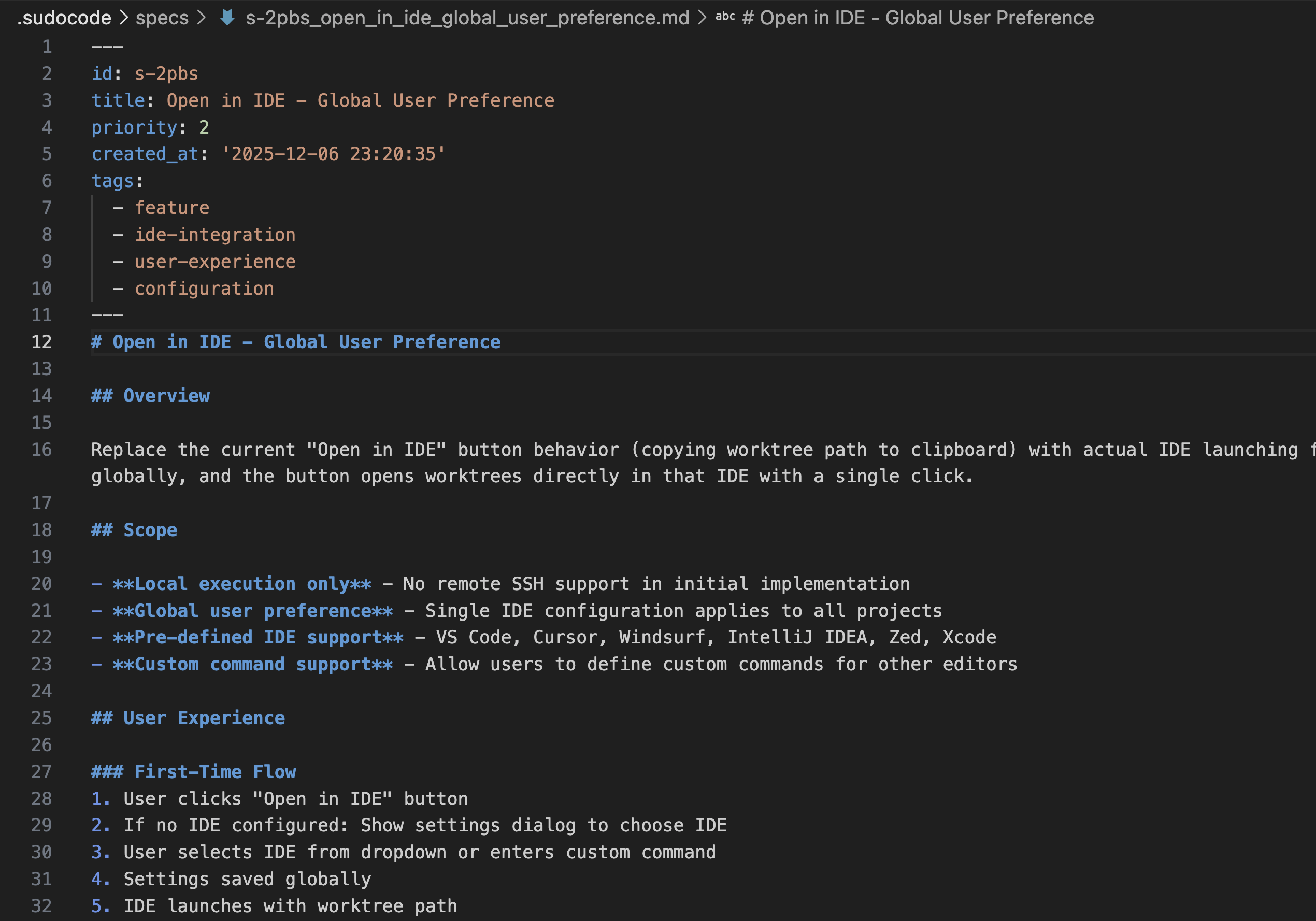 ## When to Create a Spec
Create a spec when you need to:
Capture what needs to be built and why, before breaking down into implementation tasks
Document architectural choices, API designs, or technical approaches for future reference
Provide detailed context that agents need to implement features correctly
Create a target for agents to provide feedback on requirements and discover gaps
**Don't create specs for:**
* Simple, well-understood tasks (e.g., "fix typo in README")
* Quick bug fixes with obvious solutions
## How to Create a Spec
### Method 1: Collaborative Q\&A with Agent
Have a conversation with your AI agent about requirements, then capture the discussion in a spec.
```
> User: I want to improve our 'Open in IDE' button. Right now it just copies
the worktree path to clipboard and users have to manually open their editor.
Can we make it actually launch their IDE instead?
I'm thinking:
- Single click opens the worktree in their preferred editor
- Support VS Code, Cursor, Windsurf, IntelliJ, Zed, Xcode, and custom commands
- Users configure their preference locally (not in the repo)
- Just local for now, no remote SSH
How would you approach this?
⏺ Agent: I'll help you implement a proper "Open in IDE" feature that actually
launches the user's IDE. Let me start by exploring the current implementation
to understand what we're working with.
[Agent reviews existing code]
Perfect! Now I have a good understanding. Let me present my approach:
Approach for "Open in IDE" Feature:
...
```
```
> User: Great! I want to note that users should set their preference
globally, and...
[User can provide more feedback as necessary]
⏺ Agent: Okay, I've noted this, would you like mte to create
an implementation plan?
```
```
> User: Alright, please create me a spec for this.
⏺ Agent: I'll create a comprehensive specification for the "Open in IDE"
feature with global user preferences.
⏺ plugin:sudocode:sudocode - upsert_spec (MCP)(title: "Open in IDE -
Global User Preference"...
⏺ Perfect! I've created a comprehensive specification for the "Open in IDE" feature with global user preferences. Here's what I've documented:
```
**Best for:** New features where requirements need discussion and clarification.
### Method 2: Breaking Down into Subspecifications
Point to an existing spec and break a section into a more detailed subspecification.
```
> User: I've been looking at s-abc123 (OAuth Authentication System). Section 2.4
on token refresh is pretty high-level. Can you break that down into a more
detailed subspecification?
⏺ Agent: I'll review the parent spec and create a detailed subspecification
for the token refresh section.
⏺ plugin:sudocode:sudocode - show_spec (MCP)(spec_id: "s-abc123"...
[Agent reviews the parent spec to understand context]
```
```
⏺ Agent: I've reviewed the OAuth Authentication System spec. Let me create
a detailed subspecification for the token refresh implementation.
⏺ plugin:sudocode:sudocode - upsert_spec (MCP)(title: "OAuth Token Refresh
Implementation", parent: "s-abc123"...
⏺ Created s-def456: OAuth Token Refresh Implementation. I've documented:
- Detection mechanisms for token expiration
- Refresh request flow with token rotation
- Error handling for various failure scenarios
- Security considerations for refresh token storage
This subspecification is now linked to s-abc123 as a child spec.
```
```
> User: Can you show me the parent spec to confirm it's linked?
⏺ Agent: Sure, let me show you the parent spec.
⏺ plugin:sudocode:sudocode - show_spec (MCP)(spec_id: "s-abc123"...
⏺ The parent spec now shows s-def456 as a child specification under
section 2.4 Token Refresh.
```
**Best for:** Complex features with multiple subsystems that each need detailed specifications.
### Method 3: Agent-Driven Research
Ask the agent to research a topic and create a spec based on findings.
```
> User: Can you research OAuth 2.0 PKCE (Proof Key for Code Exchange) and
create a spec based on your findings? I want to understand why we need it
and how to implement it properly.
⏺ Agent: I'll research PKCE for OAuth 2.0 and create a comprehensive
specification. Let me search for the official RFC and best practices.
[Agent conducts web searches, reads RFCs, and reviews best practices]
```
```
⏺ Agent: I've completed my research on PKCE. I found:
- RFC 7636 defines the standard
- PKCE prevents authorization code interception attacks
- It's now recommended for all OAuth 2.0 flows, not just public clients
- Implementation uses SHA256 code challenges with cryptographically random verifiers
Let me create a spec documenting these findings.
```
```
⏺ plugin:sudocode:sudocode - upsert_spec (MCP)(title: "PKCE for OAuth 2.0
(RFC 7636)"...
⏺ Created s-ghi789: PKCE for OAuth 2.0 (RFC 7636). I've documented:
- What PKCE is and the problems it solves
- Complete flow from code verifier generation through validation
- Implementation requirements and security best practices
- References to RFC 7636, OAuth 2.0 Security Best Practices, and OWASP guidelines
Since this relates to our OAuth Authentication System, I'll link it to s-abc123.
⏺ plugin:sudocode:sudocode - link (MCP)(from_id: "s-ghi789", to_id: "s-abc123",
type: "related"...
⏺ The specs are now linked. You can reference s-ghi789 when implementing
PKCE support in the authentication system.
```
**Best for:** Exploring new technologies, documenting industry standards, or researching best practices.
## Organizing Specs
### Hierarchical Organization
Use parent-child relationships for complex features:
```
SPEC-005: OAuth Authentication System (parent)
├── SPEC-018: Token Refresh Implementation (child)
├── SPEC-020: PKCE Implementation (child)
└── SPEC-022: Token Storage Strategy (child)
```
Simply ask an agent to create these relationships, after specifying which specs to connect.
### Cross-References
Link related specs using `[[SPEC-ID]]` syntax:
```markdown theme={null}
This spec builds on the authentication system described in [[SPEC-005]].
See [[SPEC-020]] for PKCE implementation details.
```
Or ask an agent to add a reference to a spec, by mentioning the name or ID of the other spec.
### Tagging
Use tags for categorization and filtering. Agents automatically add tags based on content, but you can also specify them explicitly when creating or updating specs.
## Best Practices
Explain **why** this feature exists before describing **what** it does.
**Good:**
```markdown theme={null}
## Goals
Prevent API abuse while supporting legitimate heavy usage.
Free tier users need basic access, paid users need higher limits.
## Requirements
- Free tier: 100 requests/minute
- Paid tier: 1000 requests/minute
```
**Bad:**
```markdown theme={null}
## Requirements
Rate limiting with two tiers.
```
Specs should describe **what** and **why**, not **how**.
**Requirements (spec):**
```markdown theme={null}
Tokens must expire to limit damage from theft.
Access tokens should be short-lived (minutes).
Refresh tokens should enable re-authentication without credentials.
```
**Implementation (code/issues):**
```markdown theme={null}
Use JWT with RS256 signing.
Access tokens expire in 15 minutes.
Refresh tokens stored in Redis with 7-day TTL.
```
Specs are living documents. Agents will provide feedback:
```markdown theme={null}
## Token Expiration
Tokens should expire appropriately.
```
Agent feedback:
```
Issue ISSUE-025: "Token expiration policy not specified. Recommend:
- Access tokens: 15 minutes
- Refresh tokens: 7 days"
```
Updated spec:
```markdown theme={null}
## Token Expiration
- Access tokens: 15 minutes (limit damage from theft)
- Refresh tokens: 7 days (balance convenience vs security)
Feedback from [[ISSUE-025]]
```
## Linking Specs to Issues
Create implementation relationships between specs and issues using the `implements` relationship. Simply ask an agent to link an issue with a spec.
Below is an example of what the agent will do:
```json theme={null}
{
"tool": "show_spec",
"parameters": {
"spec_id": "SPEC-005"
}
}
```
```json theme={null}
{
"tool": "upsert_issue",
"parameters": {
"title": "Implement OAuth authorization flow",
"description": "Implements [[SPEC-005]] section 2.1",
"priority": 0
}
}
```
Returns: `{ "id": "ISSUE-042" }`
```json theme={null}
{
"tool": "link",
"parameters": {
"from_id": "ISSUE-042",
"to_id": "SPEC-005",
"type": "implements"
}
}
```
Now agents know that `ISSUE-042` implements `SPEC-005` and can provide feedback on the spec during implementation.
## Related Documentation
Creating and organizing implementation issues
Agents claiming and completing work
Practical workflow examples
Deep dive on specifications
## Next Steps
Pick the spec creation method that fits your task:
* **Collaborative Q\&A**: New features needing discussion
* **Subspecifications**: Breaking down complex features
* **Agent research**: Exploring new technologies
* **Existing code**: Documenting current implementations
Try creating a spec using Method 1 (collaborative Q\&A):
```
You: "I want to add [feature]. Let me explain the requirements..."
Agent: [Asks clarifying questions]
You: "Let's capture that in a spec."
```
Break down your spec into issues:
* Review the [issue creation guide](/mcp/issue-creation)
* Link issues to spec using `implements` relationship
As agents implement, they'll discover gaps and provide feedback on your spec. This is normal and valuable - specs improve through implementation.
## When to Create a Spec
Create a spec when you need to:
Capture what needs to be built and why, before breaking down into implementation tasks
Document architectural choices, API designs, or technical approaches for future reference
Provide detailed context that agents need to implement features correctly
Create a target for agents to provide feedback on requirements and discover gaps
**Don't create specs for:**
* Simple, well-understood tasks (e.g., "fix typo in README")
* Quick bug fixes with obvious solutions
## How to Create a Spec
### Method 1: Collaborative Q\&A with Agent
Have a conversation with your AI agent about requirements, then capture the discussion in a spec.
```
> User: I want to improve our 'Open in IDE' button. Right now it just copies
the worktree path to clipboard and users have to manually open their editor.
Can we make it actually launch their IDE instead?
I'm thinking:
- Single click opens the worktree in their preferred editor
- Support VS Code, Cursor, Windsurf, IntelliJ, Zed, Xcode, and custom commands
- Users configure their preference locally (not in the repo)
- Just local for now, no remote SSH
How would you approach this?
⏺ Agent: I'll help you implement a proper "Open in IDE" feature that actually
launches the user's IDE. Let me start by exploring the current implementation
to understand what we're working with.
[Agent reviews existing code]
Perfect! Now I have a good understanding. Let me present my approach:
Approach for "Open in IDE" Feature:
...
```
```
> User: Great! I want to note that users should set their preference
globally, and...
[User can provide more feedback as necessary]
⏺ Agent: Okay, I've noted this, would you like mte to create
an implementation plan?
```
```
> User: Alright, please create me a spec for this.
⏺ Agent: I'll create a comprehensive specification for the "Open in IDE"
feature with global user preferences.
⏺ plugin:sudocode:sudocode - upsert_spec (MCP)(title: "Open in IDE -
Global User Preference"...
⏺ Perfect! I've created a comprehensive specification for the "Open in IDE" feature with global user preferences. Here's what I've documented:
```
**Best for:** New features where requirements need discussion and clarification.
### Method 2: Breaking Down into Subspecifications
Point to an existing spec and break a section into a more detailed subspecification.
```
> User: I've been looking at s-abc123 (OAuth Authentication System). Section 2.4
on token refresh is pretty high-level. Can you break that down into a more
detailed subspecification?
⏺ Agent: I'll review the parent spec and create a detailed subspecification
for the token refresh section.
⏺ plugin:sudocode:sudocode - show_spec (MCP)(spec_id: "s-abc123"...
[Agent reviews the parent spec to understand context]
```
```
⏺ Agent: I've reviewed the OAuth Authentication System spec. Let me create
a detailed subspecification for the token refresh implementation.
⏺ plugin:sudocode:sudocode - upsert_spec (MCP)(title: "OAuth Token Refresh
Implementation", parent: "s-abc123"...
⏺ Created s-def456: OAuth Token Refresh Implementation. I've documented:
- Detection mechanisms for token expiration
- Refresh request flow with token rotation
- Error handling for various failure scenarios
- Security considerations for refresh token storage
This subspecification is now linked to s-abc123 as a child spec.
```
```
> User: Can you show me the parent spec to confirm it's linked?
⏺ Agent: Sure, let me show you the parent spec.
⏺ plugin:sudocode:sudocode - show_spec (MCP)(spec_id: "s-abc123"...
⏺ The parent spec now shows s-def456 as a child specification under
section 2.4 Token Refresh.
```
**Best for:** Complex features with multiple subsystems that each need detailed specifications.
### Method 3: Agent-Driven Research
Ask the agent to research a topic and create a spec based on findings.
```
> User: Can you research OAuth 2.0 PKCE (Proof Key for Code Exchange) and
create a spec based on your findings? I want to understand why we need it
and how to implement it properly.
⏺ Agent: I'll research PKCE for OAuth 2.0 and create a comprehensive
specification. Let me search for the official RFC and best practices.
[Agent conducts web searches, reads RFCs, and reviews best practices]
```
```
⏺ Agent: I've completed my research on PKCE. I found:
- RFC 7636 defines the standard
- PKCE prevents authorization code interception attacks
- It's now recommended for all OAuth 2.0 flows, not just public clients
- Implementation uses SHA256 code challenges with cryptographically random verifiers
Let me create a spec documenting these findings.
```
```
⏺ plugin:sudocode:sudocode - upsert_spec (MCP)(title: "PKCE for OAuth 2.0
(RFC 7636)"...
⏺ Created s-ghi789: PKCE for OAuth 2.0 (RFC 7636). I've documented:
- What PKCE is and the problems it solves
- Complete flow from code verifier generation through validation
- Implementation requirements and security best practices
- References to RFC 7636, OAuth 2.0 Security Best Practices, and OWASP guidelines
Since this relates to our OAuth Authentication System, I'll link it to s-abc123.
⏺ plugin:sudocode:sudocode - link (MCP)(from_id: "s-ghi789", to_id: "s-abc123",
type: "related"...
⏺ The specs are now linked. You can reference s-ghi789 when implementing
PKCE support in the authentication system.
```
**Best for:** Exploring new technologies, documenting industry standards, or researching best practices.
## Organizing Specs
### Hierarchical Organization
Use parent-child relationships for complex features:
```
SPEC-005: OAuth Authentication System (parent)
├── SPEC-018: Token Refresh Implementation (child)
├── SPEC-020: PKCE Implementation (child)
└── SPEC-022: Token Storage Strategy (child)
```
Simply ask an agent to create these relationships, after specifying which specs to connect.
### Cross-References
Link related specs using `[[SPEC-ID]]` syntax:
```markdown theme={null}
This spec builds on the authentication system described in [[SPEC-005]].
See [[SPEC-020]] for PKCE implementation details.
```
Or ask an agent to add a reference to a spec, by mentioning the name or ID of the other spec.
### Tagging
Use tags for categorization and filtering. Agents automatically add tags based on content, but you can also specify them explicitly when creating or updating specs.
## Best Practices
Explain **why** this feature exists before describing **what** it does.
**Good:**
```markdown theme={null}
## Goals
Prevent API abuse while supporting legitimate heavy usage.
Free tier users need basic access, paid users need higher limits.
## Requirements
- Free tier: 100 requests/minute
- Paid tier: 1000 requests/minute
```
**Bad:**
```markdown theme={null}
## Requirements
Rate limiting with two tiers.
```
Specs should describe **what** and **why**, not **how**.
**Requirements (spec):**
```markdown theme={null}
Tokens must expire to limit damage from theft.
Access tokens should be short-lived (minutes).
Refresh tokens should enable re-authentication without credentials.
```
**Implementation (code/issues):**
```markdown theme={null}
Use JWT with RS256 signing.
Access tokens expire in 15 minutes.
Refresh tokens stored in Redis with 7-day TTL.
```
Specs are living documents. Agents will provide feedback:
```markdown theme={null}
## Token Expiration
Tokens should expire appropriately.
```
Agent feedback:
```
Issue ISSUE-025: "Token expiration policy not specified. Recommend:
- Access tokens: 15 minutes
- Refresh tokens: 7 days"
```
Updated spec:
```markdown theme={null}
## Token Expiration
- Access tokens: 15 minutes (limit damage from theft)
- Refresh tokens: 7 days (balance convenience vs security)
Feedback from [[ISSUE-025]]
```
## Linking Specs to Issues
Create implementation relationships between specs and issues using the `implements` relationship. Simply ask an agent to link an issue with a spec.
Below is an example of what the agent will do:
```json theme={null}
{
"tool": "show_spec",
"parameters": {
"spec_id": "SPEC-005"
}
}
```
```json theme={null}
{
"tool": "upsert_issue",
"parameters": {
"title": "Implement OAuth authorization flow",
"description": "Implements [[SPEC-005]] section 2.1",
"priority": 0
}
}
```
Returns: `{ "id": "ISSUE-042" }`
```json theme={null}
{
"tool": "link",
"parameters": {
"from_id": "ISSUE-042",
"to_id": "SPEC-005",
"type": "implements"
}
}
```
Now agents know that `ISSUE-042` implements `SPEC-005` and can provide feedback on the spec during implementation.
## Related Documentation
Creating and organizing implementation issues
Agents claiming and completing work
Practical workflow examples
Deep dive on specifications
## Next Steps
Pick the spec creation method that fits your task:
* **Collaborative Q\&A**: New features needing discussion
* **Subspecifications**: Breaking down complex features
* **Agent research**: Exploring new technologies
* **Existing code**: Documenting current implementations
Try creating a spec using Method 1 (collaborative Q\&A):
```
You: "I want to add [feature]. Let me explain the requirements..."
Agent: [Asks clarifying questions]
You: "Let's capture that in a spec."
```
Break down your spec into issues:
* Review the [issue creation guide](/mcp/issue-creation)
* Link issues to spec using `implements` relationship
As agents implement, they'll discover gaps and provide feedback on your spec. This is normal and valuable - specs improve through implementation.