> ## Documentation Index
> Fetch the complete documentation index at: https://docs.sudocode.ai/llms.txt
> Use this file to discover all available pages before exploring further.
# Overview
> Visualize and orchestrate your sudocode project through a local web interface
## What is the Web Server?
The sudocode web server is a local web application that provides a visual interface and control plane for managing your sudocode project. It gives you a browser-based view of your specs, issues, and relationships while also serving as a coordination layer for dispatching work to AI agents.
The web server runs locally on your machine (typically at `http://localhost:3000`) and provides real-time visualization of your project context alongside agent orchestration capabilities.
## Why Use the Web Server?
**See your entire project at a glance**
* Rendered markdown specs with live relationships
* Kanban board for issue tracking
* Real-time feedback display
**Coordinate AI agents like a team**
* Dispatch issues to agents on worktrees
* Monitor agent progress in real-time
* Review completed work and feedback
**Beyond what MCP alone provides**
* Visual spec writing and editing
* Drag-and-drop issue management
* Interactive dependency management
**Your data stays on your machine**
* Runs entirely locally
* Git-based persistence
* Connects to your configured coding agent
## Web Server vs. MCP Server
The web server and MCP server complement each other:
| Feature | MCP Server | Web Server |
| ----------------- | ------------------------------------- | ----------------------------------------- |
| **Primary Use** | Direct agent integration | Visual management + orchestration |
| **Interface** | Agent chat sessions | Browser-based UI for humans |
| **Agent Access** | Built into agent workflows | Dispatch agents from UI |
| **Visualization** | Plain Markdown files and CLI commands | Rich visual interface |
| **Best For** | Synchronous agent autonomy | Human oversight, multi-agent coordination |
| **Setup** | MCP configuration in agent or plugin | Simple `sudocode server` command |
The sudocode server uses the MCP server under the hood to enable agent access to the sudocode database. Think of the web server as a control plane and visualization layer on top of MCP functionality.
## Key Features
### 1. Spec Visualization
View specifications as beautifully rendered markdown with live relationship tracking:
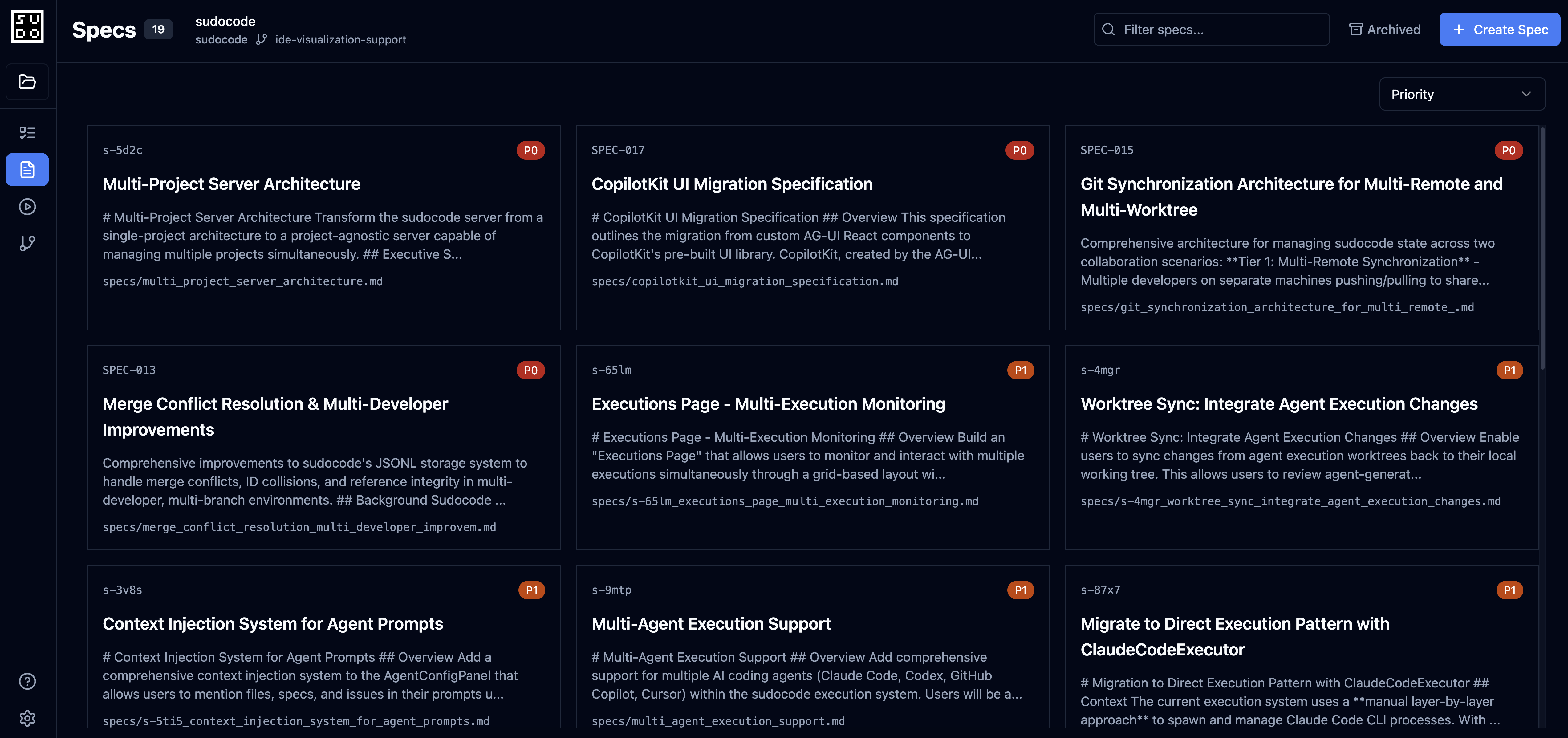 * Click on `[[spec-id]]` references to navigate
* See incoming/outgoing relationships
* View anchored feedback inline
* Edit specs with live preview
### 2. Issue Management
Kanban-style board for organizing work:
* Click on `[[spec-id]]` references to navigate
* See incoming/outgoing relationships
* View anchored feedback inline
* Edit specs with live preview
### 2. Issue Management
Kanban-style board for organizing work:
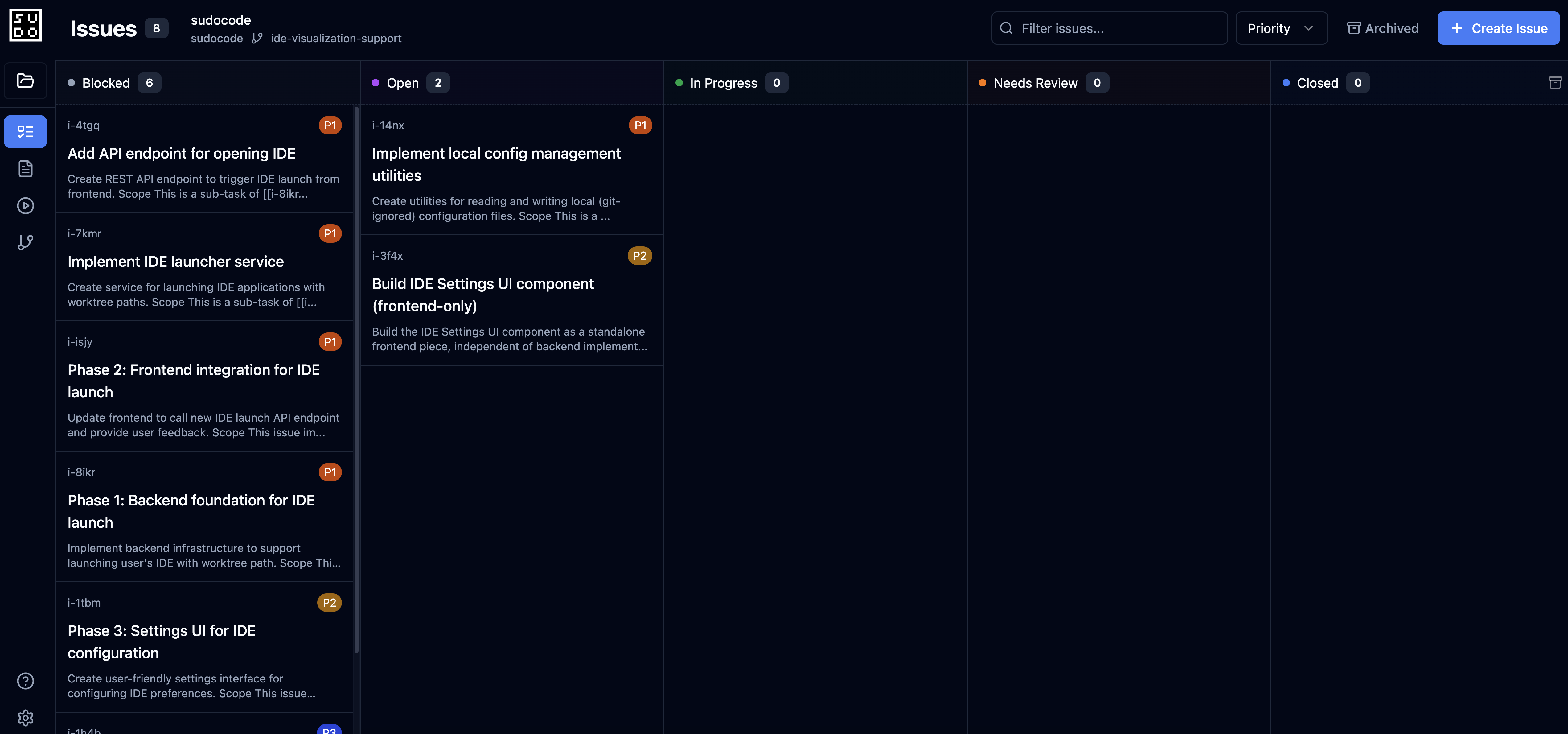 * Drag issues between open/in\_progress/blocked/closed
* Filter by priority, tags, or assignee
* Dispatch issues to agents
* Monitor agent progress
### 3. Agent Dispatch
Coordinate multiple AI agents from one interface:
* Drag issues between open/in\_progress/blocked/closed
* Filter by priority, tags, or assignee
* Dispatch issues to agents
* Monitor agent progress
### 3. Agent Dispatch
Coordinate multiple AI agents from one interface:
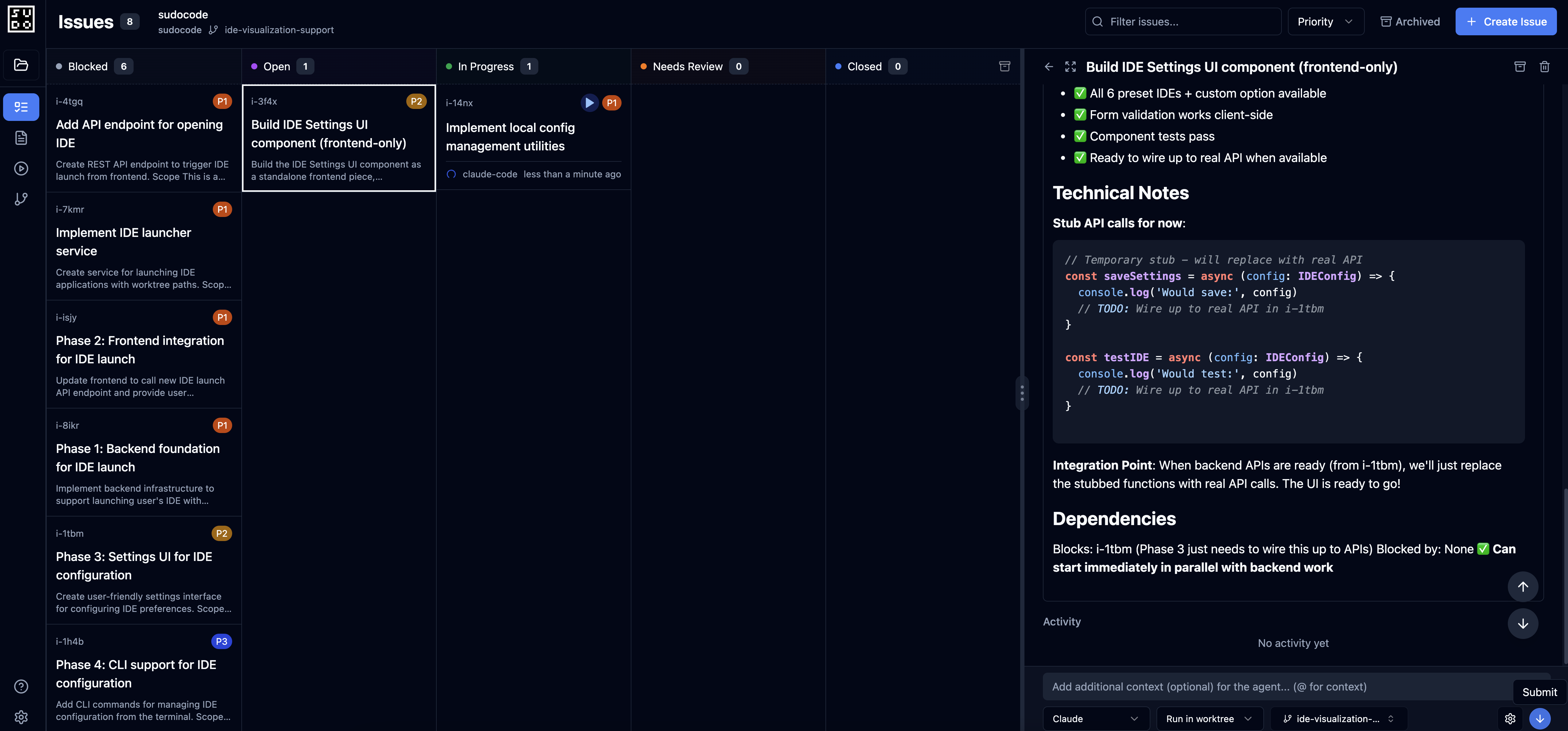 * Select ready issues and assign to agents
* Launch agents with specific context
* Track multiple agents working in parallel
* Review agent-provided feedback
### 4. Real-Time Updates
The web server uses WebSockets for live updates:
* See changes as agents work
* File watcher detects external edits
* Automatic sync across all connected clients
* No manual refresh needed
## How It Works
```mermaid theme={null}
graph TB
A[Web Browser] -->|HTTP/WebSocket| B[Web Server]
B -->|REST API| C[sudocode Database]
B -->|File Watcher| D[.sudocode/ files]
B -->|Agent Dispatch| E[AI Agents]
E -->|MCP Tools| C
style A fill:#6B9AFF
style B fill:#A855F7
style C fill:#10B981
style E fill:#F59E0B
```
**The flow:**
1. You run `sudocode server` in your project
2. Web server starts
3. Open your browser to [http://localhost:3000](http://localhost:3000)
4. You view specs, manage issues, and dispatch agents
5. Agents connect via MCP and work on issues
6. Web server displays real-time progress and results
## Use Cases
**Scenario:** You're using Claude Code but want to see your full project context at a glance.
**Solution:** Run the web server alongside Claude Code:
* Claude Code accesses context via MCP
* You visualize and organize context in the browser
* Both stay in sync automatically
**Scenario:** Your team needs to review specs and coordinate agent work.
**Solution:** Use the web server as a shared view:
* Team members view specs and issues in browser
* Agents work through MCP integration
* All changes sync via git
* Web server provides real-time updates
**Scenario:** You want to run multiple agents on different tasks simultaneously.
**Solution:** Dispatch and monitor agents from the web UI:
* Select ready issues for each agent
* Launch agents from the interface
* Monitor progress in real-time
* Review completed work and feedback
**Scenario:** You want a better experience for writing and organizing specs.
**Solution:** Use the web server's spec editor:
* Visual markdown editor with live preview
* Auto-complete for `[[references]]`
* Drag-and-drop file uploads
* Instant feedback from agent reviews
## What's Included
The web server provides:
**REST API:**
* CRUD operations for specs, issues, relationships, feedback
* Query endpoints for ready work, blocked issues, stats
* Agent execution endpoints for dispatching work
**WebSocket Server:**
* Real-time updates for connected clients
* Live sync with file system changes
* Agent progress notifications
**Web UI:**
* Spec browser with rendered markdown
* Kanban board for issues
* Agent dispatch interface
* Dependency graph visualization
**Built-In Agent:**
* Agentic spec writing from the UI
* Issue creation workflows
* Automated feedback generation
The web server's agent capabilities depend on the MCP server being configured. The web server provides the UI and coordination, while agents connect via MCP to access the sudocode database.
## Related Documentation
Set up and launch your first web server
Detailed comparison and when to use each
Write specs using the web interface
Organize and dispatch issues
Review and manage agent feedback
Configure MCP for agent access
## Next Steps
Follow the [Quick Start guide](/web/quick-start) to launch your web server in minutes
Set up an [MCP agent](/quickstart#step-4:-set-up-your-agent) for AI-assisted spec creation and issue management
Use the [Spec Writing guide](/web/spec-writing) to capture requirements
Learn [Issue Management](/web/issue-management) to coordinate agent work
* Select ready issues and assign to agents
* Launch agents with specific context
* Track multiple agents working in parallel
* Review agent-provided feedback
### 4. Real-Time Updates
The web server uses WebSockets for live updates:
* See changes as agents work
* File watcher detects external edits
* Automatic sync across all connected clients
* No manual refresh needed
## How It Works
```mermaid theme={null}
graph TB
A[Web Browser] -->|HTTP/WebSocket| B[Web Server]
B -->|REST API| C[sudocode Database]
B -->|File Watcher| D[.sudocode/ files]
B -->|Agent Dispatch| E[AI Agents]
E -->|MCP Tools| C
style A fill:#6B9AFF
style B fill:#A855F7
style C fill:#10B981
style E fill:#F59E0B
```
**The flow:**
1. You run `sudocode server` in your project
2. Web server starts
3. Open your browser to [http://localhost:3000](http://localhost:3000)
4. You view specs, manage issues, and dispatch agents
5. Agents connect via MCP and work on issues
6. Web server displays real-time progress and results
## Use Cases
**Scenario:** You're using Claude Code but want to see your full project context at a glance.
**Solution:** Run the web server alongside Claude Code:
* Claude Code accesses context via MCP
* You visualize and organize context in the browser
* Both stay in sync automatically
**Scenario:** Your team needs to review specs and coordinate agent work.
**Solution:** Use the web server as a shared view:
* Team members view specs and issues in browser
* Agents work through MCP integration
* All changes sync via git
* Web server provides real-time updates
**Scenario:** You want to run multiple agents on different tasks simultaneously.
**Solution:** Dispatch and monitor agents from the web UI:
* Select ready issues for each agent
* Launch agents from the interface
* Monitor progress in real-time
* Review completed work and feedback
**Scenario:** You want a better experience for writing and organizing specs.
**Solution:** Use the web server's spec editor:
* Visual markdown editor with live preview
* Auto-complete for `[[references]]`
* Drag-and-drop file uploads
* Instant feedback from agent reviews
## What's Included
The web server provides:
**REST API:**
* CRUD operations for specs, issues, relationships, feedback
* Query endpoints for ready work, blocked issues, stats
* Agent execution endpoints for dispatching work
**WebSocket Server:**
* Real-time updates for connected clients
* Live sync with file system changes
* Agent progress notifications
**Web UI:**
* Spec browser with rendered markdown
* Kanban board for issues
* Agent dispatch interface
* Dependency graph visualization
**Built-In Agent:**
* Agentic spec writing from the UI
* Issue creation workflows
* Automated feedback generation
The web server's agent capabilities depend on the MCP server being configured. The web server provides the UI and coordination, while agents connect via MCP to access the sudocode database.
## Related Documentation
Set up and launch your first web server
Detailed comparison and when to use each
Write specs using the web interface
Organize and dispatch issues
Review and manage agent feedback
Configure MCP for agent access
## Next Steps
Follow the [Quick Start guide](/web/quick-start) to launch your web server in minutes
Set up an [MCP agent](/quickstart#step-4:-set-up-your-agent) for AI-assisted spec creation and issue management
Use the [Spec Writing guide](/web/spec-writing) to capture requirements
Learn [Issue Management](/web/issue-management) to coordinate agent work