

What is the Web Server?
The sudocode web server is a local web application that provides a visual interface and control plane for managing your sudocode project. It gives you a browser-based view of your specs, issues, and relationships while also serving as a coordination layer for dispatching work to AI agents.The web server runs locally on your machine (typically at
http://localhost:3000) and provides real-time visualization of your project context alongside agent orchestration capabilities.Why Use the Web Server?
Visual Context Management
See your entire project at a glance
- Rendered markdown specs with live relationships
- Kanban board for issue tracking
- Real-time feedback display
Agent Orchestration
Coordinate AI agents like a team
- Dispatch issues to agents on worktrees
- Monitor agent progress in real-time
- Review completed work and feedback
Enhanced Workflows
Beyond what MCP alone provides
- Visual spec writing and editing
- Drag-and-drop issue management
- Interactive dependency management
Local & Private
Your data stays on your machine
- Runs entirely locally
- Git-based persistence
- Connects to your configured coding agent
Web Server vs. MCP Server
The web server and MCP server complement each other:Key Features
1. Spec Visualization
View specifications as beautifully rendered markdown with live relationship tracking: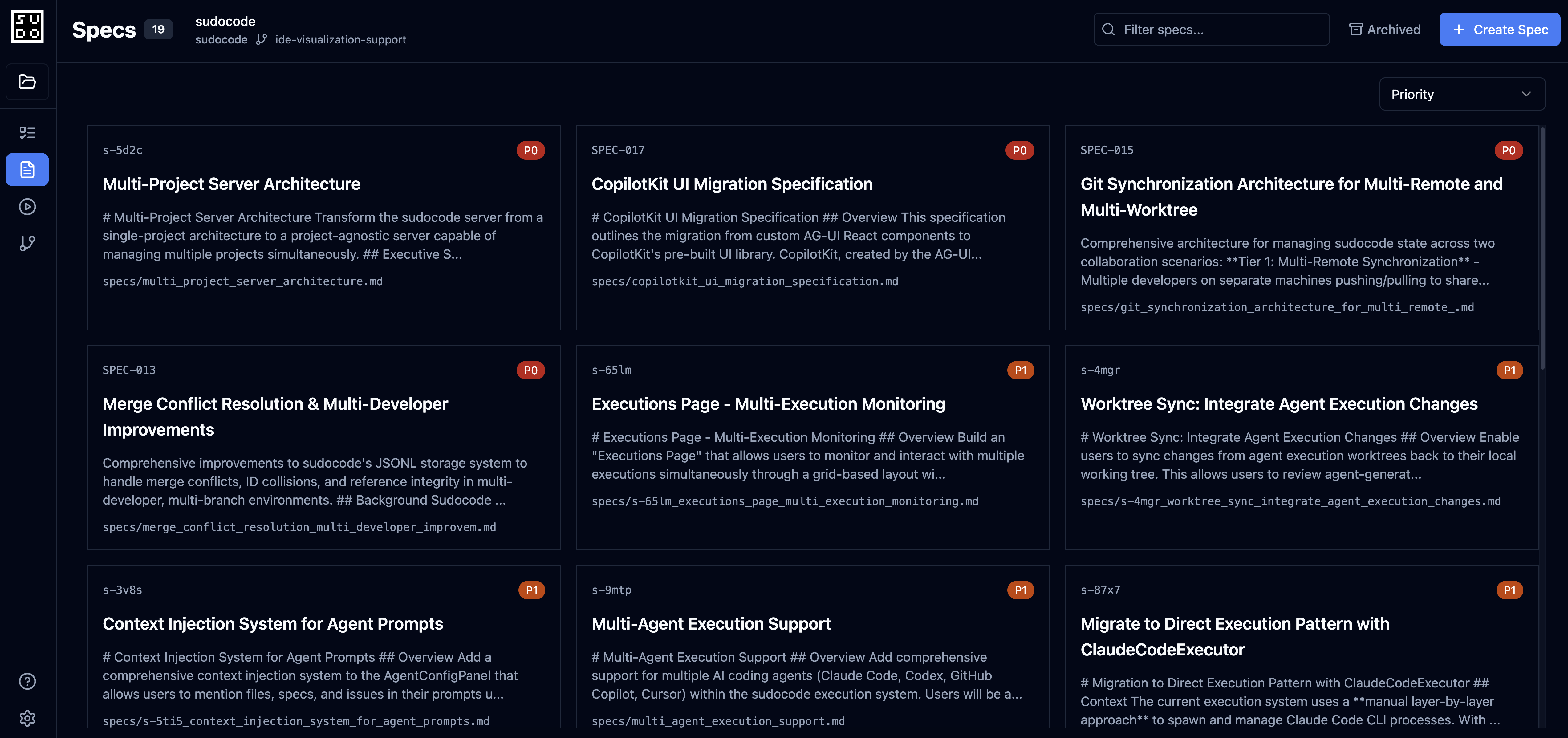
- Click on
[[spec-id]]references to navigate - See incoming/outgoing relationships
- View anchored feedback inline
- Edit specs with live preview
2. Issue Management
Kanban-style board for organizing work: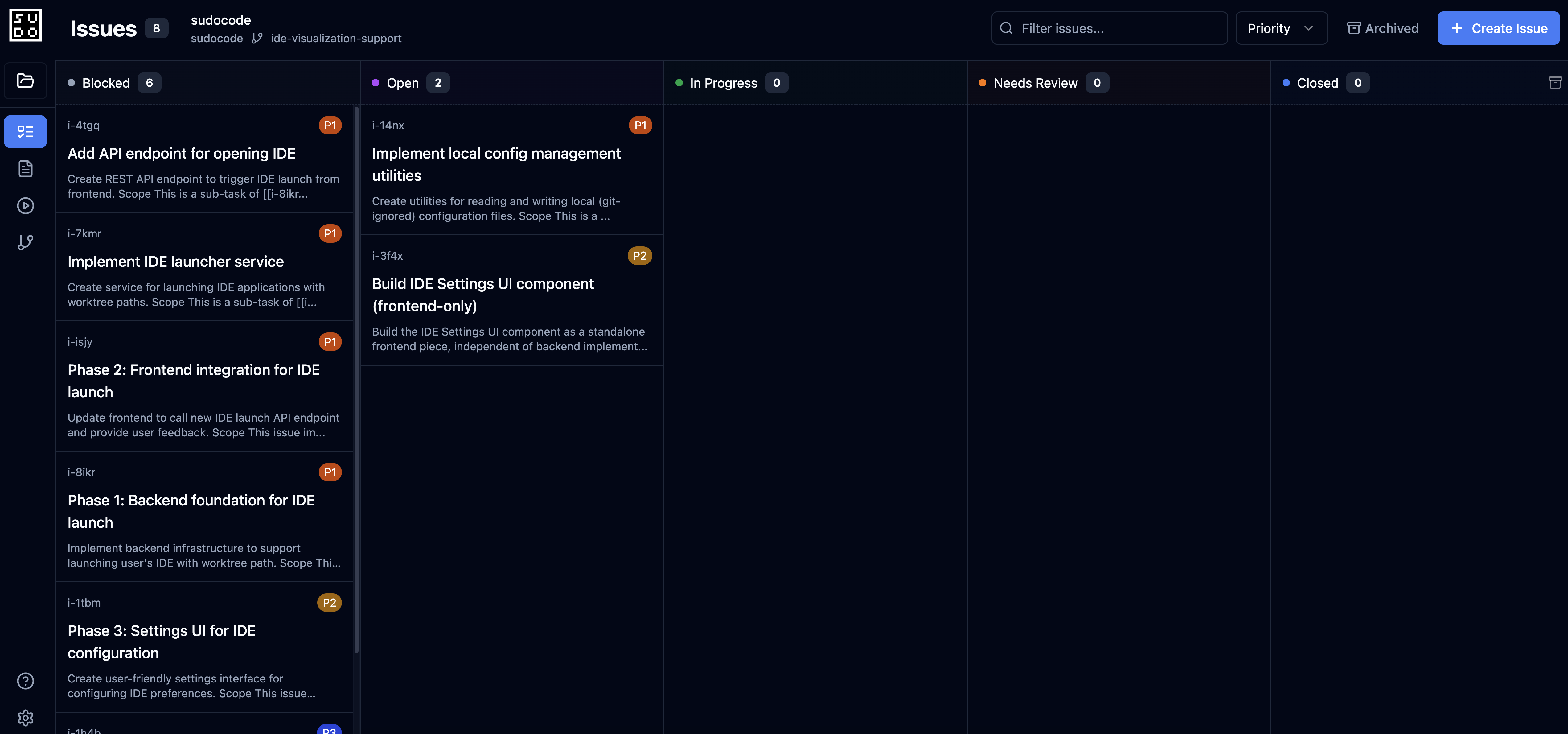
- Drag issues between open/in_progress/blocked/closed
- Filter by priority, tags, or assignee
- Dispatch issues to agents
- Monitor agent progress
3. Agent Dispatch
Coordinate multiple AI agents from one interface: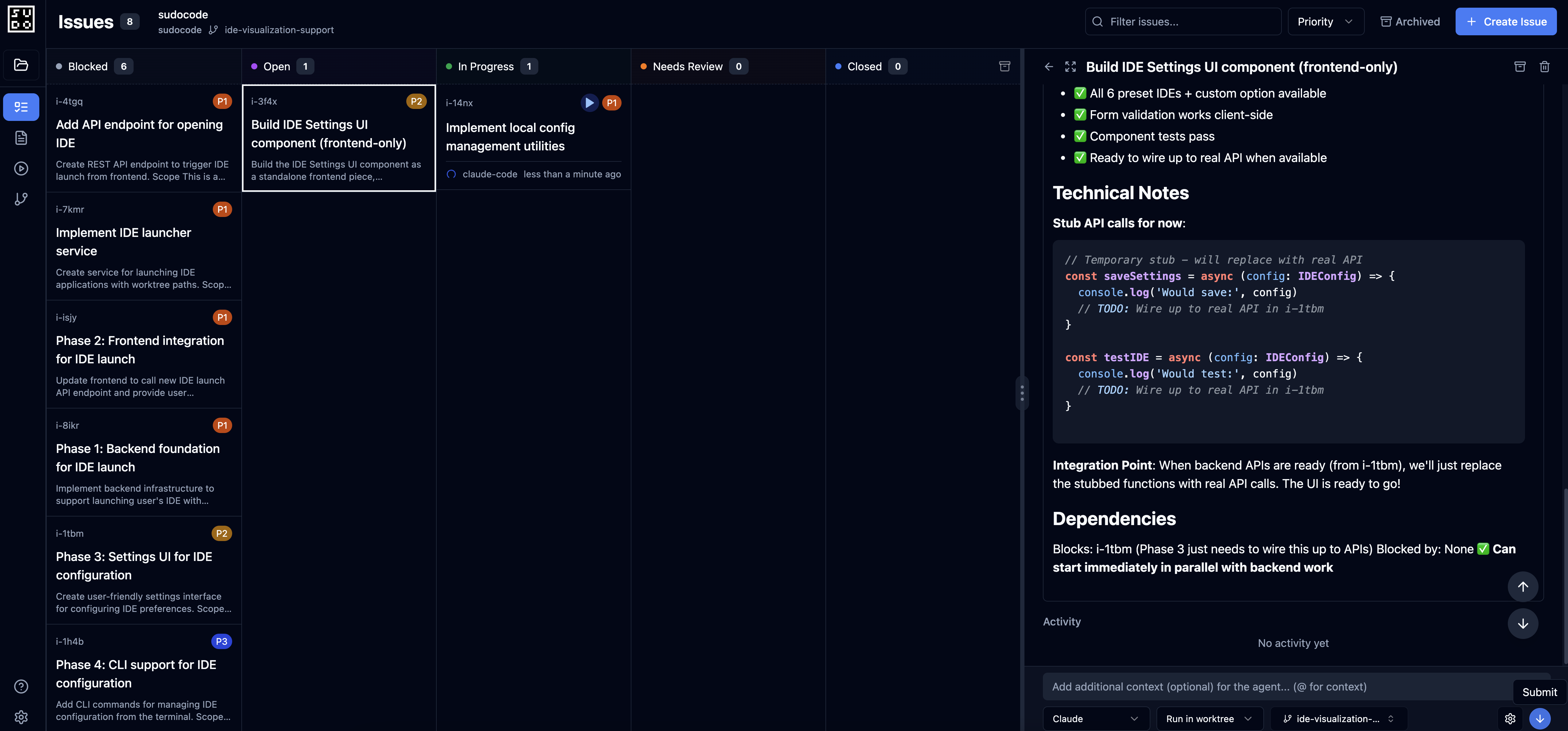
- Select ready issues and assign to agents
- Launch agents with specific context
- Track multiple agents working in parallel
- Review agent-provided feedback
4. Real-Time Updates
The web server uses WebSockets for live updates:- See changes as agents work
- File watcher detects external edits
- Automatic sync across all connected clients
- No manual refresh needed
How It Works
The flow:- You run
sudocode serverin your project - Web server starts
- Open your browser to http://localhost:3000
- You view specs, manage issues, and dispatch agents
- Agents connect via MCP and work on issues
- Web server displays real-time progress and results
Use Cases
Solo Developer: Visual Context Layer
Solo Developer: Visual Context Layer
Scenario: You’re using Claude Code but want to see your full project context at a glance.Solution: Run the web server alongside Claude Code:
- Claude Code accesses context via MCP
- You visualize and organize context in the browser
- Both stay in sync automatically
Multi-Agent Orchestration: Control Plane
Multi-Agent Orchestration: Control Plane
Scenario: You want to run multiple agents on different tasks simultaneously.Solution: Dispatch and monitor agents from the web UI:
- Select ready issues for each agent
- Launch agents from the interface
- Monitor progress in real-time
- Review completed work and feedback
Spec Writing: Enhanced Editor
Spec Writing: Enhanced Editor
Scenario: You want a better experience for writing and organizing specs.Solution: Use the web server’s spec editor:
- Visual markdown editor with live preview
- Auto-complete for
[[references]] - Drag-and-drop file uploads
- Instant feedback from agent reviews
What’s Included
The web server provides: REST API:- CRUD operations for specs, issues, relationships, feedback
- Query endpoints for ready work, blocked issues, stats
- Agent execution endpoints for dispatching work
- Real-time updates for connected clients
- Live sync with file system changes
- Agent progress notifications
- Spec browser with rendered markdown
- Kanban board for issues
- Agent dispatch interface
- Dependency graph visualization
- Agentic spec writing from the UI
- Issue creation workflows
- Automated feedback generation
The web server’s agent capabilities depend on the MCP server being configured. The web server provides the UI and coordination, while agents connect via MCP to access the sudocode database.
Related Documentation
Getting Started
Set up and launch your first web server
MCP vs Web Server
Detailed comparison and when to use each
Spec Writing
Write specs using the web interface
Issue Management
Organize and dispatch issues
Feedback Workflows
Review and manage agent feedback
MCP Server Setup
Configure MCP for agent access
Next Steps
1
Quick Start
Follow the Quick Start guide to launch your web server in minutes
2
Configure MCP agent
Set up an MCP agent for AI-assisted spec creation and issue management
3
Create your first spec
Use the Spec Writing guide to capture requirements
4
Dispatch your first issue
Learn Issue Management to coordinate agent work